
|
Key Takeaways
|
|
In recent years, Wi-Fi has emerged as the de facto architecture for local area networks (LANs) and campus networks. Wi-Fi is also gaining more widespread usage in factories and operational technology environments.
Despite its ubiquity, Wi-Fi presents some persistent challenges for network operations center (NOC) teams. Fundamentally, it’s very difficult for these teams to ensure optimized service delivery in Wi-Fi environments, and track performance within the context of the complex networks that user transmissions are reliant upon.
Today, most network operations teams still monitor Wi-Fi as if it were a wired service, with no comprehension of aspects like radio integrity or user movement.
Think about it. Can your NOC team answer the following questions regarding Wi-Fi network delivery?
- How do I discover and visualize my multi-vendor wireless networks, and track them along with my wired and software-defined environments?
- How do I determine which infrastructure elements of my wireless network need attention now?
- How do I understand whether and how LAN, WAN, and SD-WAN outages affect the experiences of Wi-Fi users?
- How do I respond to localized challenges of slow Wi-Fi performance?
- How do I anticipate Wi-Fi performance issues before there’s an impact on users?
To gain this kind of visibility, you need a highly scalable, multi-vendor network management solution that correlates Wi-Fi, SDN, and traditional network events, along with radio frequency metrics to deliver a complete view of wireless network health.
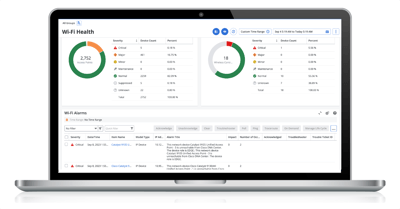 Software vendors must empower teams in today’s NOCs to monitor wireless networks using standard operational workflows for alarm management, ticketing, and triage. However, these workflows must also incorporate awareness of radio frequency metrics, noise level, interference, and wireless user demographics and movements. Level 2 and 3 NOC teams also need to apply field-proven analytics to Wi-Fi, incorporating factors like baselines, deviation from normal, time over threshold, and business hours.
With these capabilities, you can expect to see these results:
- Faster delivery of new services to market
- More accurate ticketing for Wi-Fi issues and escalations
- Accelerated detection of the root cause of network issues
- Improved network availability
To learn more, be sure to check out a recent webcast I hosted: Wi-Fi, LAN, and WAN Performance for Your Enterprise Networks.

Jeremy Rossbach
As the Chief Technical Evangelist for NetOps by Broadcom, Jeremy is passionate about meeting with customers to identify their IT operational challenges and produce solutions that fit their business and network transformation goals. Prior to joining Broadcom, he spent over 15+ years working in IT, across both public...
Other resources you might be interested in
Automic Automation: Transition to SAP RISE with Confidence
Automic Automation safeguards Clean Core architecture, mitigates SAP RISE migration risks, and unifies enterprise scheduling from mainframe to cloud.
AutoSys Workload Automation: Transition to SAP RISE with Confidence
AutoSys safeguards Clean Core architecture, mitigates SAP RISE migration risks, and unifies enterprise workload scheduling from mainframe to cloud systems.

AppNeta: Manage Alarm Rules
Learn how to create and manage alarm rules in AppNeta. Detect, isolate, and present user-impacting issues to network operations center teams.
Rally Office Hours: October 8, 2026
Find out about a new “my notifications” widget and an enhanced planned/unplanned widget. Hear about diverging axis views and upcoming cycle time widgets.

Going Off-Road: How We Bulletproofed Automic's Zero Downtime Upgrades
To ensure absolute reliability at SaaS scale, Automic Automation recently evolved its ZDU strategy.
Rally Office Hours: October 1, 2026
Explore Rally updates, including end-to-end markdown support, a new defect trend widget, an update dependency widget, and custom view migration status.
Clarity: Design Visual Layouts Using Report Designer
This course teaches you how to create new reports with the Clarity Report Designer.
Rally Office Hours: September 24, 2026
Find out about a new milestone cumulative flow diagram widget and custom view widget capacity. Get tips for handling project name changes in middleware.
Rally Office Hours: September 17, 2026
Explore Rally's new delivery confidence feature for portfolio items, hear custom view migration updates, and get expert answers to Q&A.