
|
Key Takeaways
|
|
Automic Automation 24.4 provides powerful new generative AI features, including the new ASK_AI function, which allows you to build your own automation AI agent. But how did we get here and how will this feature evolve?
Large enterprises have been relying on the automation of business-critical processes for decades. They count on proven platforms like Automic Automation to automate and orchestrate their workloads. And rightly so, as these are powerful tools whose capabilities have continually evolved to keep pace with rapid technological advances.
Thanks to a diverse ecosystem of available integrations, it is possible to automate workloads in the cloud just as efficiently as on legacy on-premises platforms. The automation of repetitive, business-critical processes not only promises essential reliability but also enables customers to focus their often-scarce resources on innovative activities.
ChatGPT 3.5 was made widely available in November 2022, impressively demonstrating the capabilities of large language models (LLMs). Ever since, the technology has been advancing at a breathtaking pace. Through the targeted application of prompt engineering techniques, the quality of the answers generated by LLM can be significantly improved, and with the fine-tuning of foundational models, models can be optimized for very specific application scenarios. Furthermore, models now have significant reasoning capabilities, which further expand the range of possible use cases. Generative AI is on everyone's lips and is experiencing increasing adoption.
Generative AI as powerful enabler
But what role does generative AI play for automation platforms like Automic Automation?
First and foremost, the technology opens up new possibilities: Generative AI can, for example, be used to make user documentation accessible in a completely new way. Furthermore, generative AI can provide great support in the analysis of automation scripts as well as reports and logs. With the release of version 24.4, this is now a reality for Automic Automation users. Within seconds, for example, thousands of lines of logs are summarized, relevant log entries are identified, possible error causes are analyzed, and suggestions for resolving the problem are generated.
Generative AI becomes an integral part of Automic workflows
A particularly powerful new feature in version 24.4 is an extension of the proprietary scripting language. The new ASK_AI function allows for conversation with an LLM within a workflow. This finally brings generative AI into the deterministic world of workload automation and orchestration.
This may seem contradictory at first glance, but upon closer inspection, it reveals itself to be an extremely powerful tool. Pretrained LLMs excel when it comes to sentiment analysis, intent recognition, classification tasks, or the creation of structured output. These strengths can now be specifically utilized in Automic workflows.
With the new ASK_AI function, for example, the content of incoming emails can be checked for the sender's intent. In a further step, the LLM connected to ASK_AI can be used to compare natural language descriptions of existing Automic workflows with the determined user intent. Even the parameters required for executing the workflow identified in this way can be extracted from the original email, with the help of ASK_AI, and incorporated into the automated execution of the workflow.
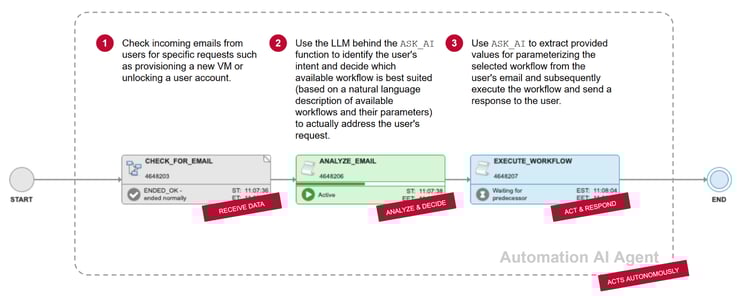
Build your own automation AI agents
This ASK_AI example demonstrates how, through the integration of an LLM, an Automic Automation workflow can make decisions based on the provided information in natural language, which determines further execution—all completely autonomously. This indeed fulfills the essential characteristics of a simple AI agent. This insight, of course, opens up a multitude of new possibilities for further reducing the need for human intervention in the automation of business-critical processes. This enables organizations to realize the full potential of a platform like Automic Automation.
It’s all about data
And yet, we are at the very beginning of a development in this regard, one that will gain additional momentum in the coming months. Ultimately, LLM just like humans, need one thing above all else to be able to make sustainable decisions independently: reliable and up-to-date data. Pretrained language models quickly reach their limits in this regard, especially since the knowledge available to them is fundamentally dependent on the time of their release. This shortcoming can be remedied with the help of so-called tool calling: teaching the LLM to contextually contact a third-party tool and query its data to incorporate it into further processing.
Data fuels autonomous decision-making
This approach is promising and is already reflected in an emerging de-facto standard: The Model Context Protocol (MCP). Developed by Anthropic, this model serves as a standardized approach for connecting AI agents with systems that contain relevant data. This approach is expected to be supported by Automic Automation in the near future. Automic Automation can act as an MCP server to provide data to AI agents. It can also function as an MCP client to retrieve data from connected third-party applications and feed their data into the LLM on which the ASK_AI function is based. This allows an automation AI agent to draw on additional data to independently make even more complex decisions.
Generative AI is entering the world of workload automation and orchestration with the groundbreaking release of Automic Automation 24.4. The first application examples already demonstrate impressive new possibilities, and the prospect of what will soon become reality is almost mind blowing. One thing is certain: the future remains exciting.

Michael Grath
Michael leads the Broadcom AOD Automation engineering organization. His responsibilities include Automic Automation, AutoSys, and Automation Analytics & Intelligence products and promoting innovation in product development through the use of generative AI.
Other resources you might be interested in

Going Off-Road: How We Bulletproofed Automic's Zero Downtime Upgrades
To ensure absolute reliability at SaaS scale, Automic Automation recently evolved its ZDU strategy.

Clarity: Design Visual Layouts Using Report Designer
This course teaches you how to create new reports with the Clarity Report Designer.
Rally Office Hours: September 24, 2026
Find out about a new milestone cumulative flow diagram widget and custom view widget capacity. Get tips for handling project name changes in middleware.
Rally Office Hours: September 17, 2026
Explore Rally's new delivery confidence feature for portfolio items, hear custom view migration updates, and get expert answers to Q&A.
Rally Office Hours: September 10, 2026
On the latest Rally Office Hours, learn more about new burn-down widgets, custom page migration updates, technical Q&A, and Broadcom community events.
Rally Office Hours: September 3, 2026
Review the latest Rally Office Hours summary covering the MCP Server upgrade, custom page migration updates, API tooling, Q&A, and upcoming event news.
AAI v26.0 Container Deployment
This foundational training course focuses on modernizing enterprise workload analytics across OpenShift and Kubernetes environments.

Automic Automation Cloud Integration: Workday
This video explains the Automic Automation Workday agent integration and its benefits. Find out how to install, configure, and use the agent.
Rally Office Hours: August 27, 2026
Explore key Rally updates for Kanban charts and saved views, get expert tips on milestone tracking, and sign up today for upcoming webinars on AI delivery.