
As I speak to our automation customers, it's noticeable that more and more are moving to a self-service solution within their scheduling environments. Change management and incident management tools now have APIs, making it unnecessary to do many manual interactions and implementations. Moreover, privilege management tools allow much of the work associated with object creation to be shifted from the scheduling teams directly to application and development teams. It's more efficient to build the design of workload objects in the DevOps toolchain—and it's also less prone to human error. Releasing the scheduling teams from the mundane day-to-day allows them to concentrate on projects that add more value, and it empowers application and development teams and removes implementation bottlenecks.
The challenge
Maintaining site standards and consistency across our environments is a significant challenge as we distribute the responsibility to ever-larger teams. Most companies have mandatory rules or guidelines when implementing changes to their workload systems and objects. These rules are often more stringent in production than in user testing and may be stricter in user testing than in development.
When developers are excited about their new “bright shiny thing” and working to meet tight deadlines, these rules can be easily forgotten or overlooked. Then, some changes need to be made during the promotion to higher-level environments, forcing the changes back into a lower environment for retesting. This causes frustration for developers and it delays their projects, ultimately resulting in added costs for the business.
The mitigation
Runbooks, operating procedures, and guides are often written but seldom read. Moreover, maintaining and distributing content is laborious as environments become more complex and new use cases are established.
To help prevent this, some customers have gone to the length of writing their own “wrapper” scripts for the AutoSys JIL binary. These scripts require a host of standard and best practice checks before allowing changes to be implemented. This wrapper script approach is only a viable solution if all changes are implemented via the AutoSys CLI. However in today's environments, changes often are made via multiple interfaces, such as the AutoSys Web UI (WCC), iXp, CLI, and REST API. Therefore, this is only a partial solution to the enforcement of site standards.
The solution
Embedded Entitlements Manager (EEM) can be used to enforce job naming conventions, but cannot do everything that you may require. AutoSys Workload Automation also has a facility that can be used to check and verify further requirements. This feature is called the JIL Verification Exit (JVE). This is essentially additional code that is called via the application server. The JVE code is executed each time a change is made, regardless of where the change was initiated, including in the CLI, AutoSys Web UI, REST API, iXp, and so on.
Over the years, I have helped multiple customers adopt the JVE. In one case, we enabled a team to retire their wrapper script entirely. The JVE can be used to either modify a JIL attribute value or remove the attribute completely, with a meaningful message provided back to the user.
Here are some of the use cases I have seen:
- Enforcing naming standards
- Limiting the maximum value of attributes, such as n_retry
- Removing attributes that are not supported/used at the customer site, such as service_desk or permission
- Modifying attribute values to meet company standards, for example, owner
- Ensuring a minimum schedule cycle, such as enforcing a minimum five-minute gap between start_mins values
- Preventing unnecessary alarms, for example, to ensure that jobs do not have alarm_if_fail and n_retry enabled
- Preventing unscheduled jobs from being dependent upon themselves
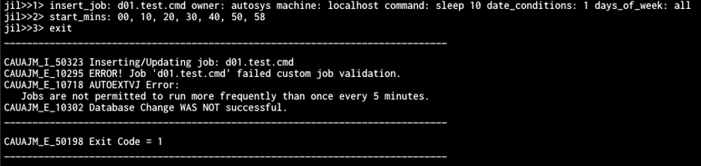
Below is an example of JVE code reading in the specified start_mins attribute. The JVE rejects the change because there is less than a five-minute gap between '00' and '58'.
Below is an example of JVE code that standardizes the owner attribute during job creation in the AutoSys Web UI. Instead of rejecting the change and causing the user more work, the JVE amends the owner attribute to “owner@DOMAIN,” and notifies the user in the output.

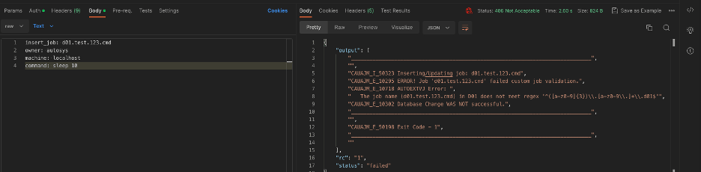
In the final example, during job creation, the JVE parses the job name to maintain naming standards, and, via the AutoSys REST API, notifies the user that the change has been unsuccessful and why.
Conclusion
As we expand the number of people providing base scheduling rules, we must enforce site standards. However, we must do so in a way that minimizes disruption and effort.
The JVE makes the operational model more efficient, regardless of how schedule changes reach AutoSys. Use it to adjust soft deviations from the standards automatically and, in doing so, prevent the need for the user to edit and resubmit the change manually. Also, use the JVE to maintain your environment's integrity, rejecting hard deviations where necessary.
Watch this demonstration to help you start with the JVE and successfully adapt to the increase in workers who create and maintain scheduling rules.

Jonathan Hiett
Jon is a world-class Solution Architect with decades of experience in the Automation industry spanning the Financial and IT industries. In his role, Jon works with organizations to help define and implement strategies for the execution, management and observability of their workload automation solutions.
Other resources you might be interested in

AAI v26.0 - Linux Standalone Upgrade
Learn how to upgrade a standalone AAI installation on Linux from version 24.4.x to 26.0. Find out about updated configuration and log structures.
Automic Automation: Transition to SAP RISE with Confidence
Automic Automation safeguards Clean Core architecture, mitigates SAP RISE migration risks, and unifies enterprise scheduling from mainframe to cloud.
AutoSys Workload Automation: Transition to SAP RISE with Confidence
AutoSys safeguards Clean Core architecture, mitigates SAP RISE migration risks, and unifies enterprise workload scheduling from mainframe to cloud systems.
AppNeta: Manage Alarm Rules
Learn how to create and manage alarm rules in AppNeta. Detect, isolate, and present user-impacting issues to network operations center teams.
Rally Office Hours: October 8, 2026
Find out about a new “my notifications” widget and an enhanced planned/unplanned widget. Hear about diverging axis views and upcoming cycle time widgets.

Going Off-Road: How We Bulletproofed Automic's Zero Downtime Upgrades
To ensure absolute reliability at SaaS scale, Automic Automation recently evolved its ZDU strategy.
Rally Office Hours: October 1, 2026
Explore Rally updates, including end-to-end markdown support, a new defect trend widget, an update dependency widget, and custom view migration status.
Clarity: Design Visual Layouts Using Report Designer
This course teaches you how to create new reports with the Clarity Report Designer.
Rally Office Hours: September 24, 2026
Find out about a new milestone cumulative flow diagram widget and custom view widget capacity. Get tips for handling project name changes in middleware.