
Network outages happen more often than you think. We may not experience them directly or even know they're occurring at all. When outages affect household names like Facebook, Amazon, Microsoft, and others, however, we're sure to find out after the fact that there was an issue.
Depending on the user's activities and the duration of the issue, stress and frustration levels can vary. When a marketer can’t get that ground-breaking advertisement up on Facebook, they can get antsy. When a hybrid worker can’t place an order for that amazing home office equipment deal on Amazon, they can feel cheated. And when we’re unable to finish up that Microsoft PowerPoint presentation that our boss is waiting for, we can get very stressed out.
Imagine how much more stressful it can be if you’re the one responsible for the service levels being delivered. Further, think about what it would be like if you’re responsible for operations at a large-scale enterprise that delivers business- or mission-critical digital services. First, the direct cost of outages can be massive. The average cost of IT downtime is $5,600 per minute or $336,000 per hour according to Gartner. Second, outages can cause more than just immediate revenue loss: staff productivity can suffer, data and other precious assets can get lost, customers can get angry and frustrated, the brand can be damaged, and the organization’s compliance status can be put at risk.
Why Do Outages Happen and What Can You Do About It?
Outages happen for a number of reasons. Cyberattacks, including ransomware, distributed denial of service (DDoS), malware, and other attacks continue to rank among the top causes of outages. Human errors like typos, misconfigurations, and cutting corners by ignoring documented procedures or applying unauthorized shortcuts are also common culprits.
What’s more, outages are getting increasingly common. Outages related to software, network, and system problems are increasing as a result of complexities from adopting cloud technologies and software-defined architectures. In particular, networks are especially problematic. According to Uptime’s 2022 Data Center Resiliency Survey, networking-related issues have been the top cause of downtime over the past three years.
For years, many network operations (NetOps) teams have relied on network monitoring tools to manage availability and performance within the four walls of their organization’s data centers. But the connectivity demands of today’s digital business are driving the need for a new approach. Now, NetOps teams need a way to gain better visibility and control of both internally managed networks and the networks run by external organizations, including cloud providers and ISPs. The question then becomes, “In today’s hyper-connected and multi-cloud environments, what can you do to prevent outages or respond faster when they happen?”
The adoption of experience-driven network observability and management can help. This approach represents a superset of network monitoring. With experience-driven network observability and management, NetOps teams can understand, manage, and optimize the performance of digital services. With this approach, teams can gain visibility into the end-to-end user experience delivery chain, including every communication path and potential degradation point. This enables teams to focus on getting ahead of issues—before they affect end users.
Three Ways to Protect User Experience in an Outage
Experience-driven network observability and management tools and practices can help your NetOps teams gain actionable insights about the current and future state of a network. They deliver these insights by ingesting telemetry on network device performance; network and internet paths; alarms, faults, logs, and configurations; cloud and SaaS application performance; network traffic flows; and user experience metrics. Armed with this intelligence, NetOps teams can take the following actions to protect the user experience from the damaging effects of outages:
- Identify user impact first. Many times, outages will impact certain applications or regions, but not others. At any time, you need to know the state of the network and how the user experience is affected by changing network conditions. With experience-driven network observability and management tools, teams can identify any application in use at any location, continuously measure its performance for each user, and understand the impact on the network that delivers it. In the case of the recent Microsoft outage, the culprit was a network connectivity issue that arose between users and Microsoft applications.
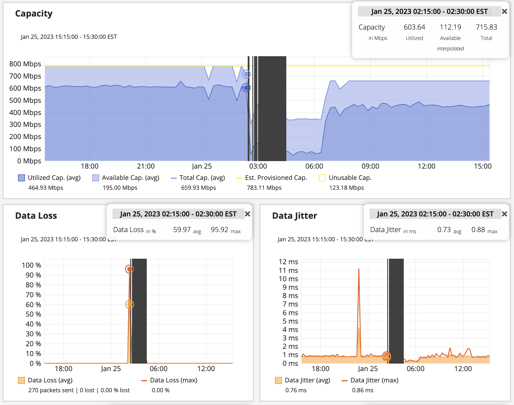
Graphs reveal connection outages and high amounts of loss and latency. -
Isolate where issues are located, and which are crucial. With these tools, teams can quickly and accurately identify the root cause of a problem. Knowing the source of the issue will either help you validate innocence or accelerate problem resolution. Using robust event correlation techniques can help you understand how outages and performance issues are affecting actual end-user experience and application delivery. As a result, you can prioritize remediation efforts based on business impact rather than simply on alarm duration or severity.
-
Employ active monitoring of the network. To use apps like Office365, which run in Microsoft’s networks, users’ connections may traverse a huge number of network hops. In the example below, over the course of 30 minutes and then one hour, the number of dynamic paths varies for a single device targeting Office 365. This illustrates how dynamic cloud environments can be. Small changes can have big consequences for connectivity. This heightens the value of actively testing network delivery to track SaaS and web applications, enabling you to proactively find and fix issues before they affect users. With experience-driven network observability and management tools, your teams can actively and continuously measure the end-to-end health, performance, and availability of the network.
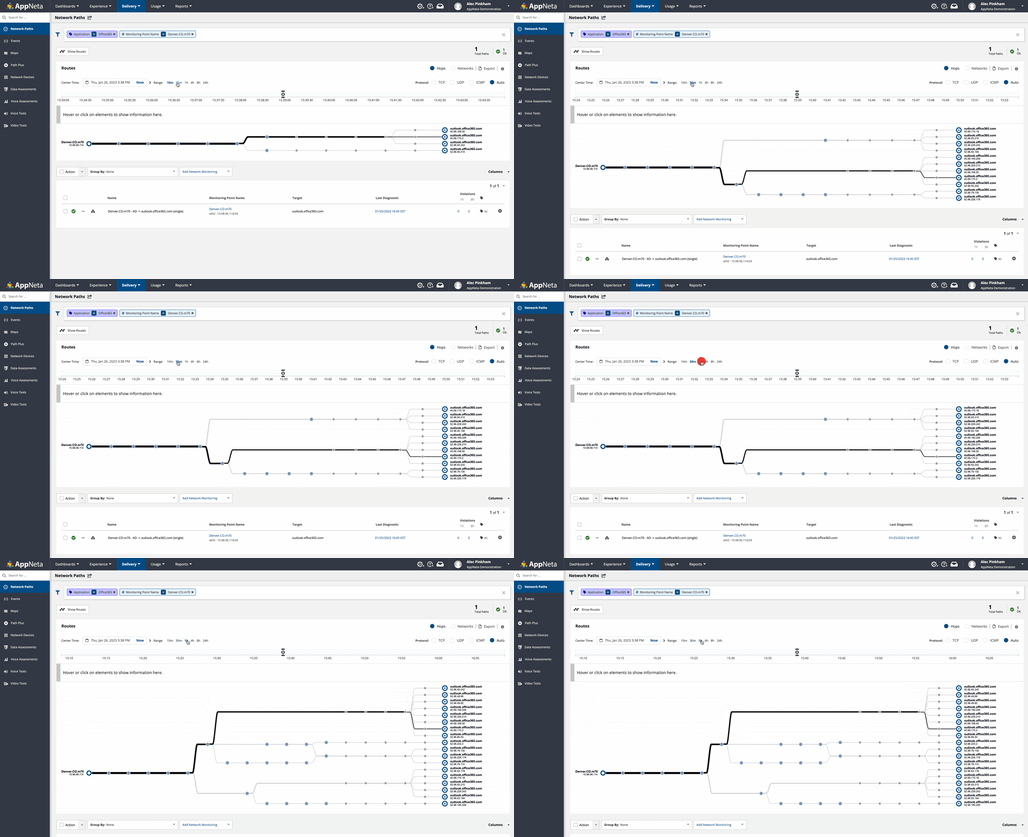
Multi-path route visualization shows how routes terminate at the edge of the Microsoft network.
How Broadcom Can Help
With Broadcom, your team can establish optimized NetOps capabilities. With our solutions, you can minimize the risk and impact of network outages, streamline operations, and maximize network performance and availability. In the process, the solution helps you more fully capitalize on revenue opportunities. Register now and join our 30-minute Small Bytes webinar on February 1st at 12 PM EST to learn more about how to troubleshoot Microsoft Teams issues in today’s hybrid work environments.

Gedeon Hombrebueno
Gedeon focuses on bringing the Network Observability by Broadcom solution to market. The solution enhances network visibility to boost network operations efficiency and user experience—key to today’s business success. Gedeon has extensive product marketing, product management, and integrated marketing experience in...
Other resources you might be interested in

AAI v26.0 - Linux Standalone Upgrade
Learn how to upgrade a standalone AAI installation on Linux from version 24.4.x to 26.0. Find out about updated configuration and log structures.
Automic Automation: Transition to SAP RISE with Confidence
Automic Automation safeguards Clean Core architecture, mitigates SAP RISE migration risks, and unifies enterprise scheduling from mainframe to cloud.
AutoSys Workload Automation: Transition to SAP RISE with Confidence
AutoSys safeguards Clean Core architecture, mitigates SAP RISE migration risks, and unifies enterprise workload scheduling from mainframe to cloud systems.
AppNeta: Manage Alarm Rules
Learn how to create and manage alarm rules in AppNeta. Detect, isolate, and present user-impacting issues to network operations center teams.
Rally Office Hours: October 8, 2026
Find out about a new “my notifications” widget and an enhanced planned/unplanned widget. Hear about diverging axis views and upcoming cycle time widgets.

Going Off-Road: How We Bulletproofed Automic's Zero Downtime Upgrades
To ensure absolute reliability at SaaS scale, Automic Automation recently evolved its ZDU strategy.
Rally Office Hours: October 1, 2026
Explore Rally updates, including end-to-end markdown support, a new defect trend widget, an update dependency widget, and custom view migration status.
Clarity: Design Visual Layouts Using Report Designer
This course teaches you how to create new reports with the Clarity Report Designer.
Rally Office Hours: September 24, 2026
Find out about a new milestone cumulative flow diagram widget and custom view widget capacity. Get tips for handling project name changes in middleware.