
|
Key Takeaways
|
|
Technical developments surrounding generative artificial intelligence (GenAI) are advancing at blazing speed and are beginning to change our world for the better. This makes it all the more important to recognize the potential of this technology and leverage it sensibly to increase your competitiveness. Automic Automation is an automation platform that optimally equips you for the AI revolution—combining proven enterprise capabilities with the mind-blowing potential of GenAI.
Automation platforms have always been an indispensable enabler of digital transformation and, as such, are ideally suited to channeling AI into orderly processes and harnessing it effectively. Automic Automation and GenAI prove to be an ideal combination on several levels: GenAI provides Automic users with helpful support in implementing new automation projects and it facilitates the smooth operation of automation processes already running in production. In addition, GenAI can also function as an integral part of automation workflows, enriching deterministic tasks with intelligent decision-making and enabling the development of entire workflows as AI agents.
How retrieval-augmented generation (RAG) improves GenAI output
Despite the rapid development of new large language models (LLMs), their inherent knowledge is limited at the time of their release. For example, an LLM published a week ago knows nothing about the new scientific study published yesterday or the latest version of a REST API released just the day before. Nor would it have visibility into the recently published knowledge base article or the latest update to the corporate travel policy. To harness the potential of GenAI, such information must be integrated into the context of a conversation with an LLM. The size of the context itself, the so-called context window, is also more or less limited depending on the model chosen. Although the technical limits are increasingly being expanded, the number of tokens continues to play at least a commercial role as a common metric for billing for corresponding services.
A common approach to solving this problem is called "retrieval-augmented generation" (RAG). This method is used to identify relevant information from specific knowledge sources (retrieval), which is then integrated into the context of a query to an LLM (augmentation), thus enabling the LLM to produce a more accurate answer (generation). Instead of integrating all knowledge base articles into the context, the relevant parts of selected knowledge base articles are first identified based on the query to the LLM, and only these are used. By including only the truly relevant information in the request, the number of tokens consumed can be drastically reduced. Further, the accuracy and relevance of the response can also be significantly improved, and the likelihood of hallucinations can be reduced.

Automic Automation fuels RAG
But how does such a system work in practice? Let's imagine the following scenario: At regular intervals, the contents of new documents must be transferred to a vector database, enabling users to employ an LLM to access the contents of their company documents. Before this, a few additional steps are usually necessary. For example, the text must first be extracted from PDF documents and then broken down into smaller pieces using special splitter algorithms, which can take overlaps into account to maintain semantic coherence. In the next step, vector representations of the individual text blocks are generated using a so-called embedding model. These blocks are then stored in a vector database. Upon closer inspection, this is a classic use case for automation. And indeed, such a "RAG pipeline" can be implemented quite easily with Automic Automation.
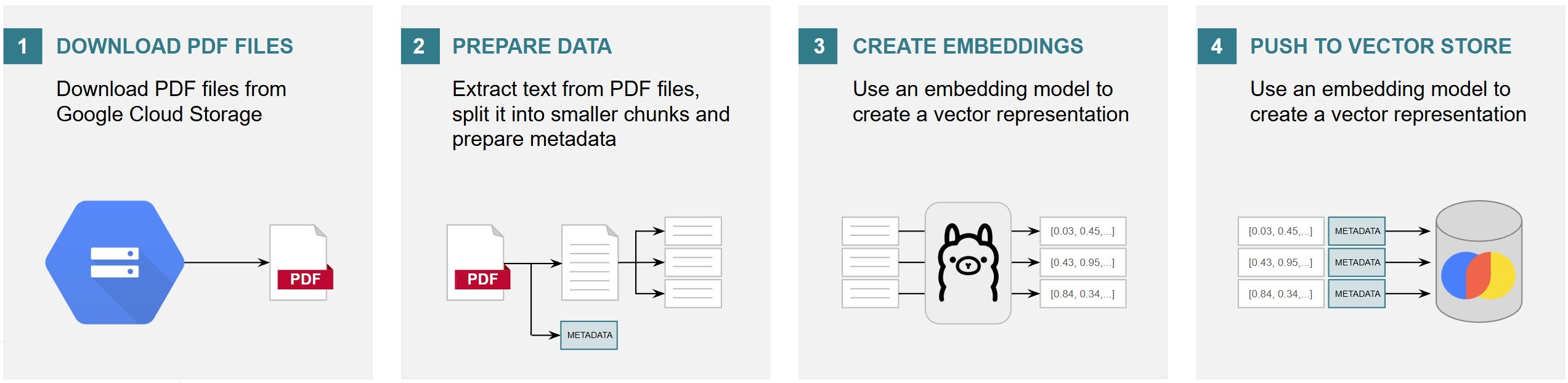
Automic’s low-code approach makes your life easier
First, you need to identify the data source and check the Automation Marketplace for the availability of a suitable integration with Automic Automation. Broadcom offers a wide range of integrations with third-party applications, which makes the creation of automated processes much easier, as they eliminate the need for specialized knowledge of third-party APIs.
With the help of a suitable integration, the desired documents can be downloaded. Further processing of these documents is most easily accomplished with Python. In effect, there’s no way for data scientists to get around Python. This reality is reflected in the large selection of useful libraries. Automic Automation offers a new job type for this, the Python job. With this, Python becomes a first-class citizen. Automic Automation developers can rely on Python and popular libraries, such as Apache Tika and Langchain, to implement those parts of the RAG pipeline that are responsible for extracting text from the PDFs and splitting it into overlapping text blocks.
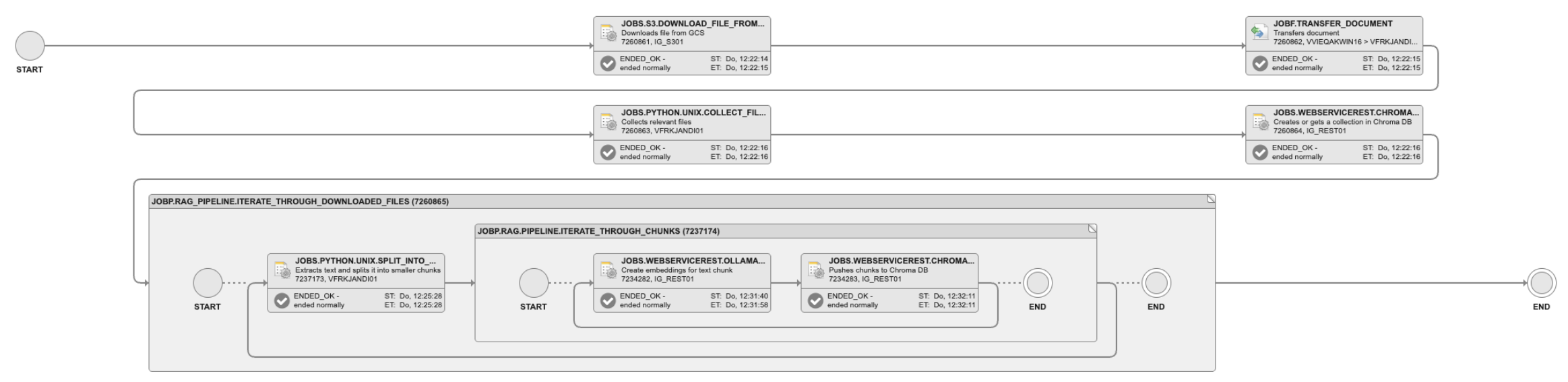
Automic REST jobs also prove helpful, allowing REST API requests to be configured in a snap. In addition, the API’s responses can be evaluated for further processing. For example, models made available via the Ollama platform can be used to generate vector embeddings using the Ollama REST API. Creating a corresponding Automic REST job makes this step much easier. The Automic REST job can also be used to store the vector representation of the individual text blocks in any vector database that also provides a corresponding REST API, such as Chroma DB. Ultimately, the individual jobs are linked together in an Automic workflow, thus automating the RAG pipeline.
RAG in action
Implementing the RAG Pipeline in combination with LLMs opens up entirely new possibilities. With the new ASK_AI Automic script function, conversations with an LLM become an integral part of an Automic workflow. In this way, individual prompts can also be used for a similarity search in documents stored in the vector store. Relevant text blocks can be identified and added to the context of the conversation with the LLM. In this application scenario, a REST job can be used to initiate the similarity search. The result of this is ultimately sent to the configured LLM in an Automic automation script with the ASK_AI script function.
Automic combines cutting-edge technologies with proven capabilities
Automic Automation proves to be an ideal platform for implementing such scenarios. The wide range of integrations available on the Automation Marketplace allows for easy connection to third-party applications. The data from these applications can ultimately be made available in a vector store. Thanks to Automic Automation's low-code approach, individual building blocks can be developed as jobs and ultimately combined into an Automic workflow. Specialized job types are available, and thanks to Python jobs, more complex business logic can also be programmed and thus integrated into the automation workflow.
Ultimately, Automic Automation also impresses customers with its proven capabilities for scheduling regular executions and its reliability in daily operations. GenAI and common design patterns such as RAG can be easily implemented with Automic Automation. It is therefore clear that Automic Automation is the right choice for combining cutting-edge technologies with proven capabilities, so teams can meet the challenges of the future.
For more on Automic Automation’s recently released features, read the following blog: Democratizing Automation With the AI-Powered Filter Assistant and Seamless Python Scripting.

Michael Grath
Michael leads the Broadcom AOD Automation engineering organization. His responsibilities include Automic Automation, AutoSys, and Automation Analytics & Intelligence products and promoting innovation in product development through the use of generative AI.
Other resources you might be interested in
Automic Automation: Transition to SAP RISE with Confidence
Automic Automation safeguards Clean Core architecture, mitigates SAP RISE migration risks, and unifies enterprise scheduling from mainframe to cloud.
AutoSys Workload Automation: Transition to SAP RISE with Confidence
AutoSys safeguards Clean Core architecture, mitigates SAP RISE migration risks, and unifies enterprise workload scheduling from mainframe to cloud systems.

AppNeta: Manage Alarm Rules
Learn how to create and manage alarm rules in AppNeta. Detect, isolate, and present user-impacting issues to network operations center teams.
Rally Office Hours: October 8, 2026
Find out about a new “my notifications” widget and an enhanced planned/unplanned widget. Hear about diverging axis views and upcoming cycle time widgets.

Going Off-Road: How We Bulletproofed Automic's Zero Downtime Upgrades
To ensure absolute reliability at SaaS scale, Automic Automation recently evolved its ZDU strategy.
Rally Office Hours: October 1, 2026
Explore Rally updates, including end-to-end markdown support, a new defect trend widget, an update dependency widget, and custom view migration status.
Clarity: Design Visual Layouts Using Report Designer
This course teaches you how to create new reports with the Clarity Report Designer.
Rally Office Hours: September 24, 2026
Find out about a new milestone cumulative flow diagram widget and custom view widget capacity. Get tips for handling project name changes in middleware.
Rally Office Hours: September 17, 2026
Explore Rally's new delivery confidence feature for portfolio items, hear custom view migration updates, and get expert answers to Q&A.