
|
Key Takeaways
|
|
Networks aren’t what they used to be. While your network operations teams still have legacy equipment to manage, they’re also contending with the expanded reliance on software-defined networking (SDN), hybrid and multi-cloud architectures, private clouds, and more. These environments are anything but static. They’re sprawling, dynamic, and evolving faster than ever—which means that establishing and retaining visibility and control is more challenging than ever.
The new demands of the new network
In today’s networks, complexity is a given. You’re managing a multi-dimensional environment that’s constantly shifting. To keep pace, your operations teams need scalable tools that are simple to use and powerful enough to handle today’s demands. You need solutions that offer visibility that is aligned with the complex, dynamic nature of today’s network environments. This means harnessing solutions that address the following key requirements:
- Intelligent clustering. Teams must be able to use a range of criteria, including location, role, segment, organization, and criticality to establish groups of elements. This is essential in managing categories of network elements in a unified, consistent fashion, which promotes quality and efficiency.
- Layering. To gain an effective, holistic understanding of dynamic network environments, it is essential to be able to gain the right level of context and detail, at the right time. Teams need to establish different levels of abstraction, spanning from high-level representations to granular details. For example, if an administrator starts at a high-level view, and sees a domain is experiencing an issue, it is critical for them to be able to immediately drill down into the domain, locate the problem device, and access details to start identifying the root cause.
- Multi-dimensional navigation. Administrators must be able to view and navigate across various clusters and layers. This requires the ability to gain comprehensive visibility across different domains, locations, and technologies, while working within a unified, standard interface.
Introducing DX NetOps Topology
With DX NetOps, teams can centralize day-to-day operations to boost efficiency and control. Now, the solution features DX NetOps Topology. DX NetOps Topology transforms how network operations teams visualize, understand, and manage modern networks. The solution is built to simplify your daily workflow, speed up problem-solving, and scale right along with your environment.
With DX NetOps Topology, you can:
- Gain end-to-end visibility. Whether you’re managing legacy systems, cutting-edge SD-WAN deployments, or a mix of pretty much everything, DX NetOps Topology provides a unified view that brings it all together. You get a “single pane of glass” that offers coverage that spans clouds, locations, and technologies.
- Troubleshoot faster with multi-hop triage. Stop relying on trial and error and guesswork when issues arise. The platform’s multi-hop triage workflows help you follow the problem path, hop by hop—so you can figure out whether that device with a red alarm is the actual culprit, or just a symptom of a deeper issue.
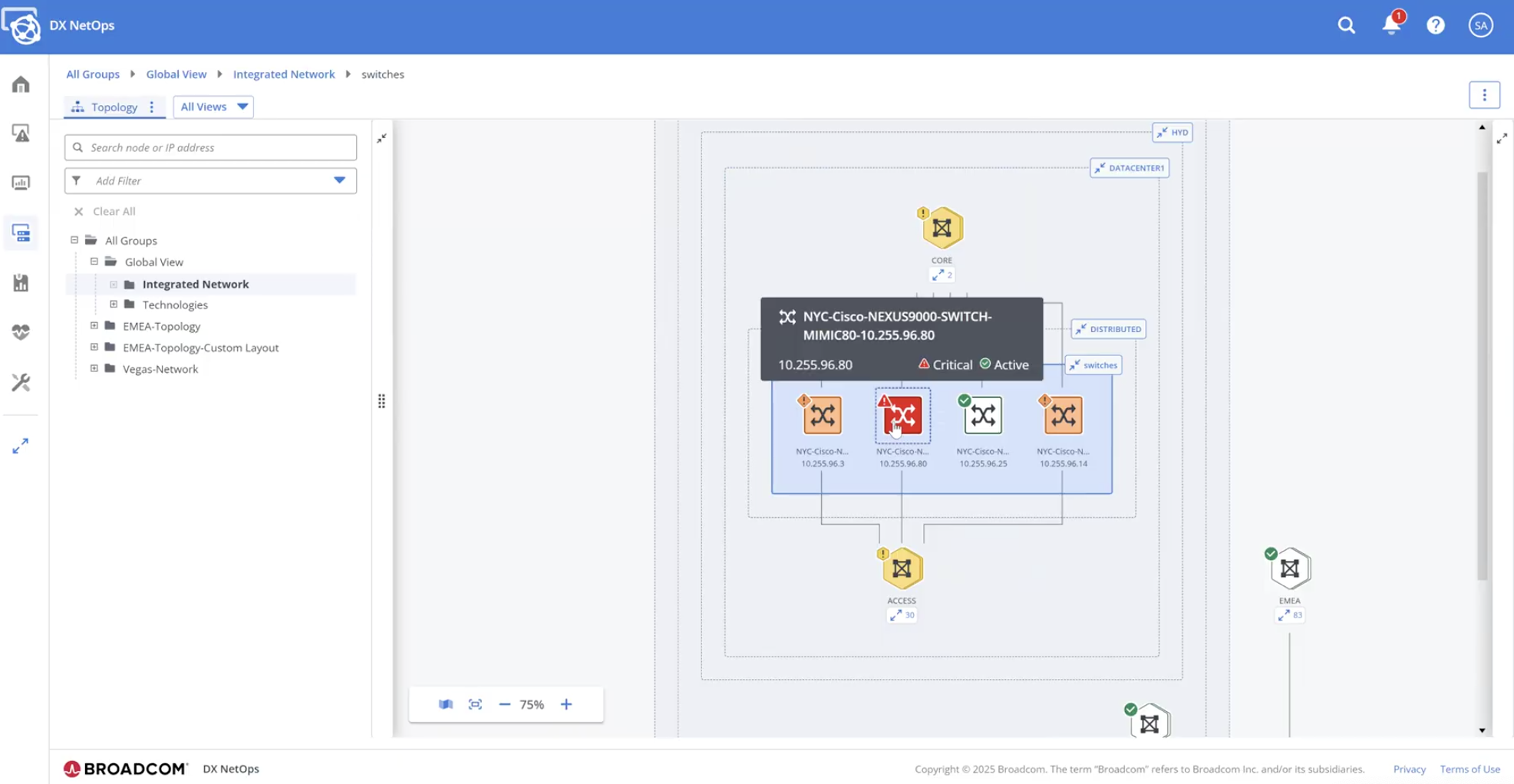
- Leverage intelligent, actionable views. Let’s say you’re troubleshooting an issue. You can either zoom in from a global view (top-down) or start with a known troubled device (bottom-up). And when it is time to act, you’re not left guessing. Every step in your navigation is packed with context—think alarms, metrics, port details—all shown right when you need them.
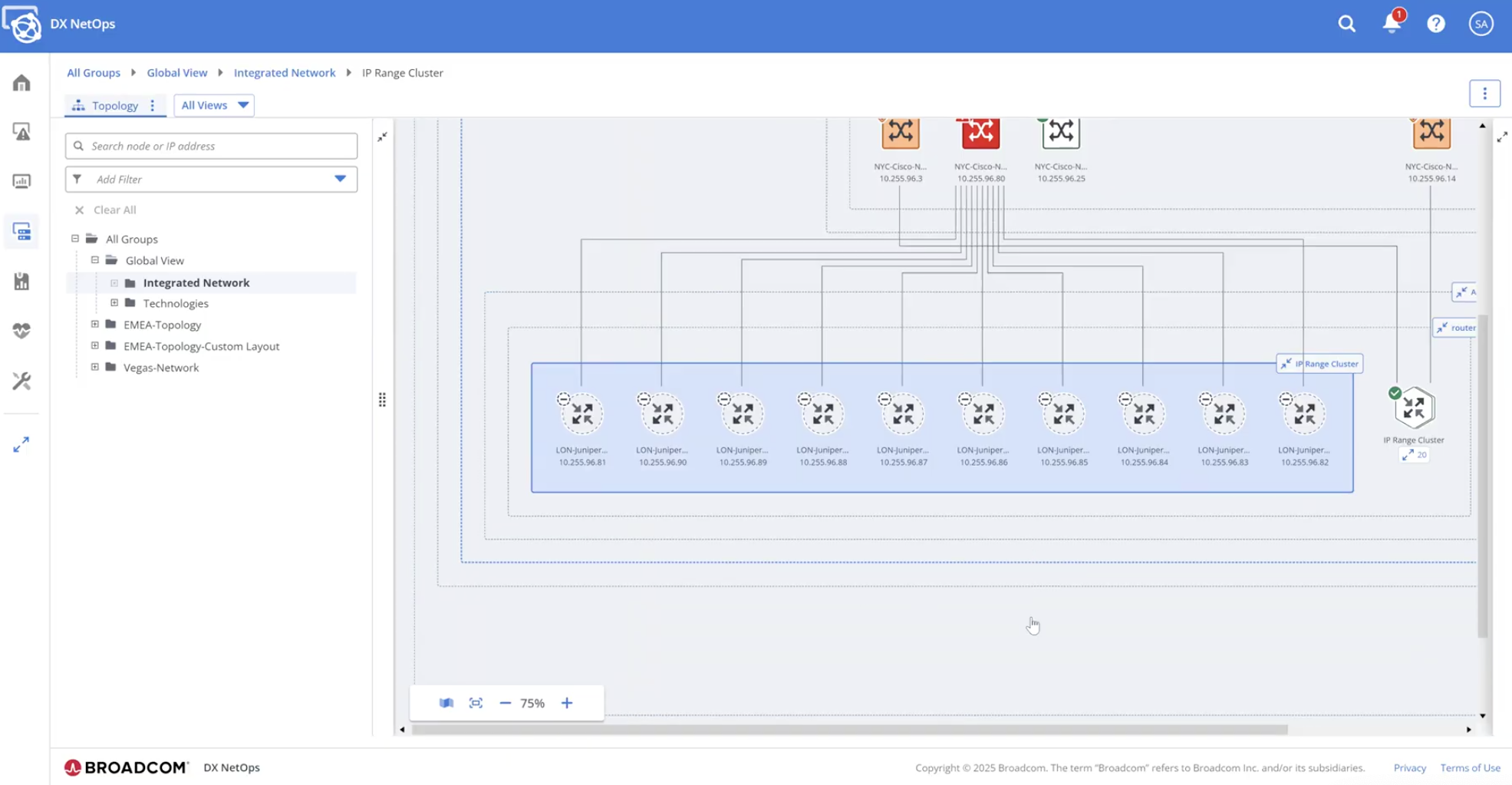
- Work smarter with intelligent clustering and layered views. You can organize elements by location, role, criticality, or any custom dimension you need. From a high-level overview to granular device details, layering gives you the control and perspective to dive deep when necessary—and do it quickly.
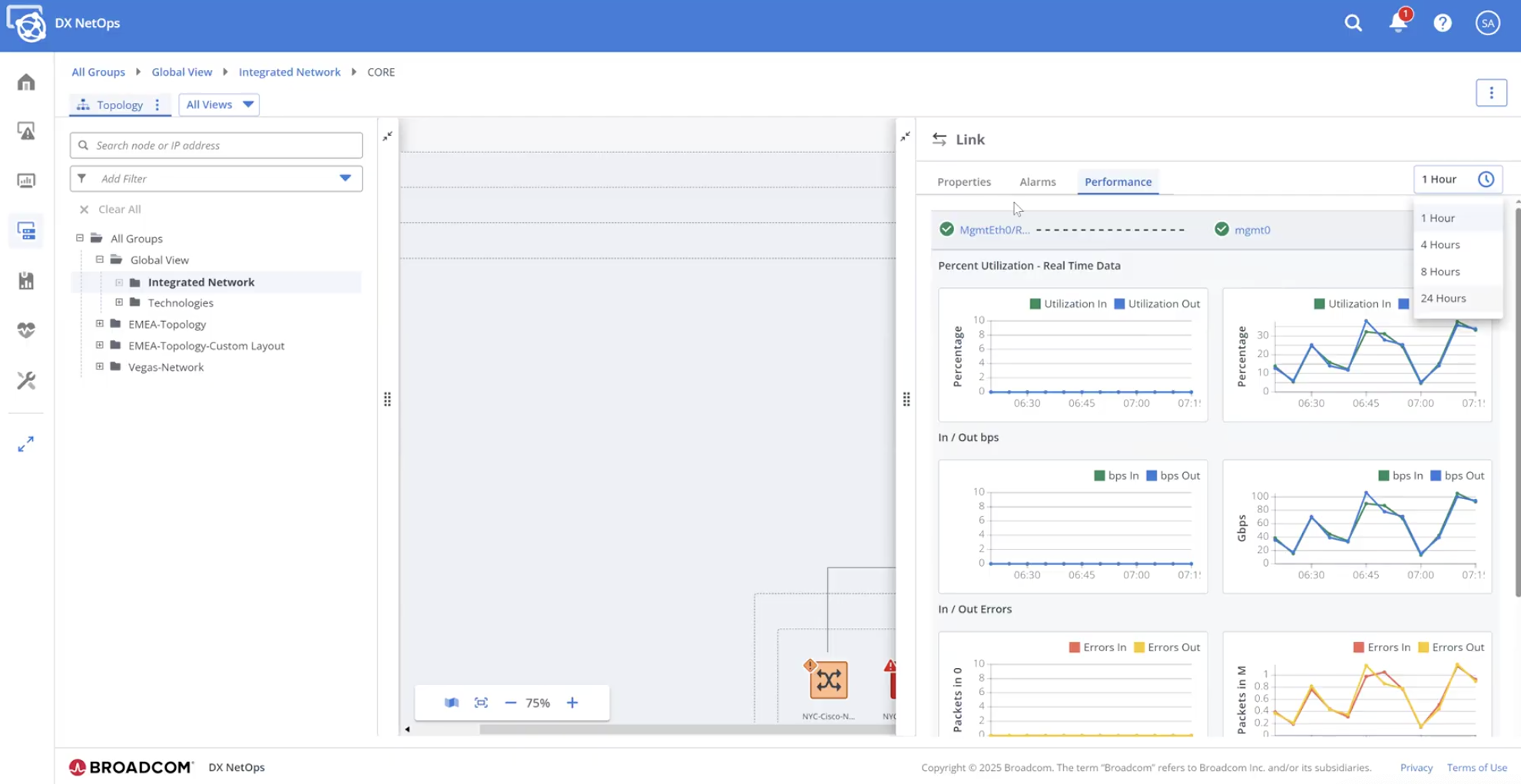
- Personalize your experience. Filters make it easy to narrow in by region, site, technology, or device type. You can even save those filtered views for later—so next time, you’re a click away from the insights you need.
- Stay ready for what comes next. With flexible integrations and a forward-looking roadmap, DX NetOps Topology is designed to grow with your organization, supporting emerging technologies and evolving infrastructures.
How it works
Once deployed, DX NetOps Topology becomes part of your inventory menu. Open it, and you’ll get a powerful visualization panel with zoom, search, and filtering tools. A detailed panel on the right gives you everything you need—alarms, metrics, port details, and more.
Whether you’re planning ahead or responding to a critical outage, this view gives you the clarity and control you need.
Example: Viptela SD-WAN
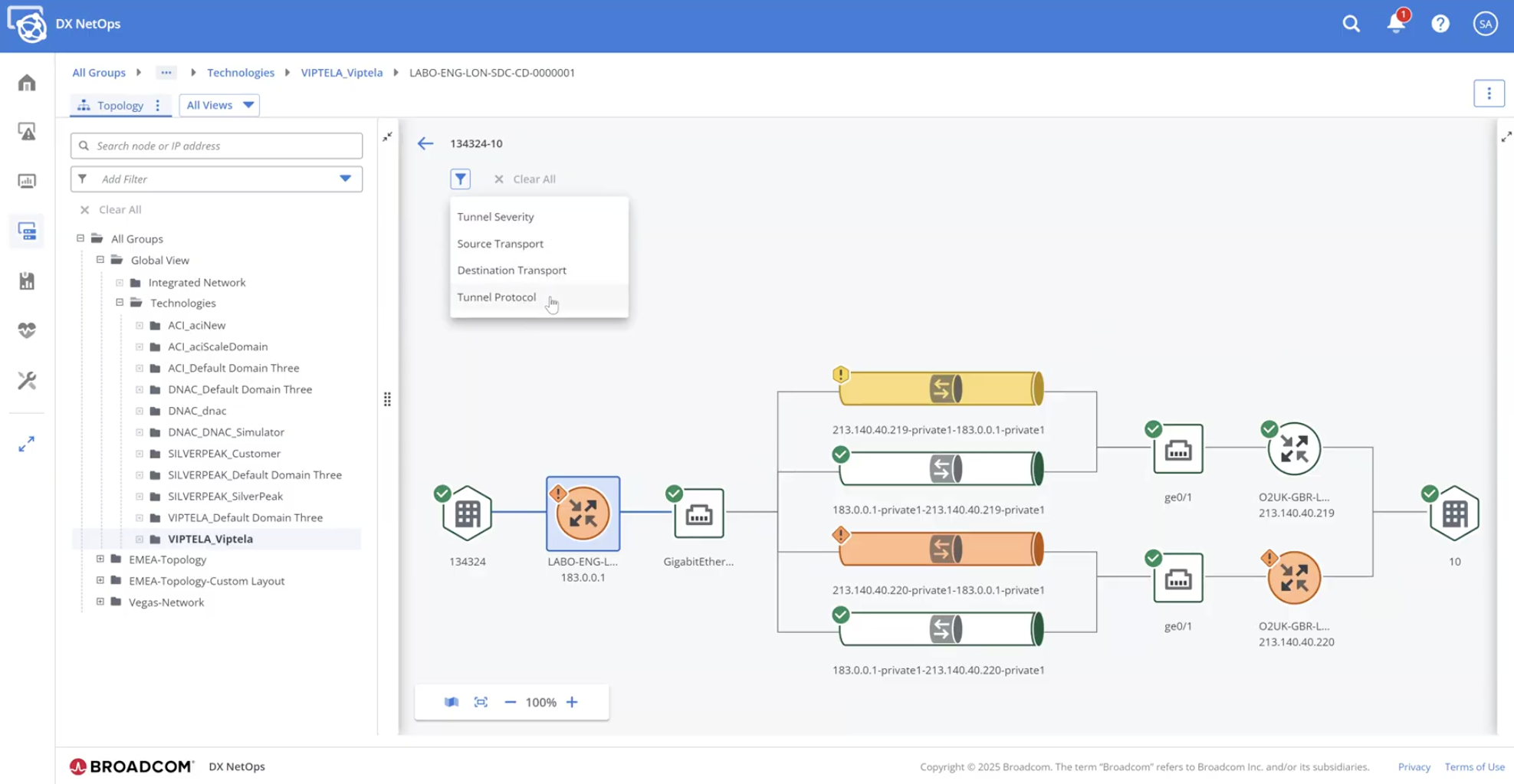
Managing SD-WAN? With DX NetOps Topology, you get unified, correlated views of both traditional and software-defined environments. For example, in a Viptela SD-WAN deployment that spans multiple locations, you can view the entire control and data plane. You’ll be able to:
- See physical routers, ports, and tunnels.
- Understand overlay and underlay relationships.
- Investigate issues quickly with a single click.
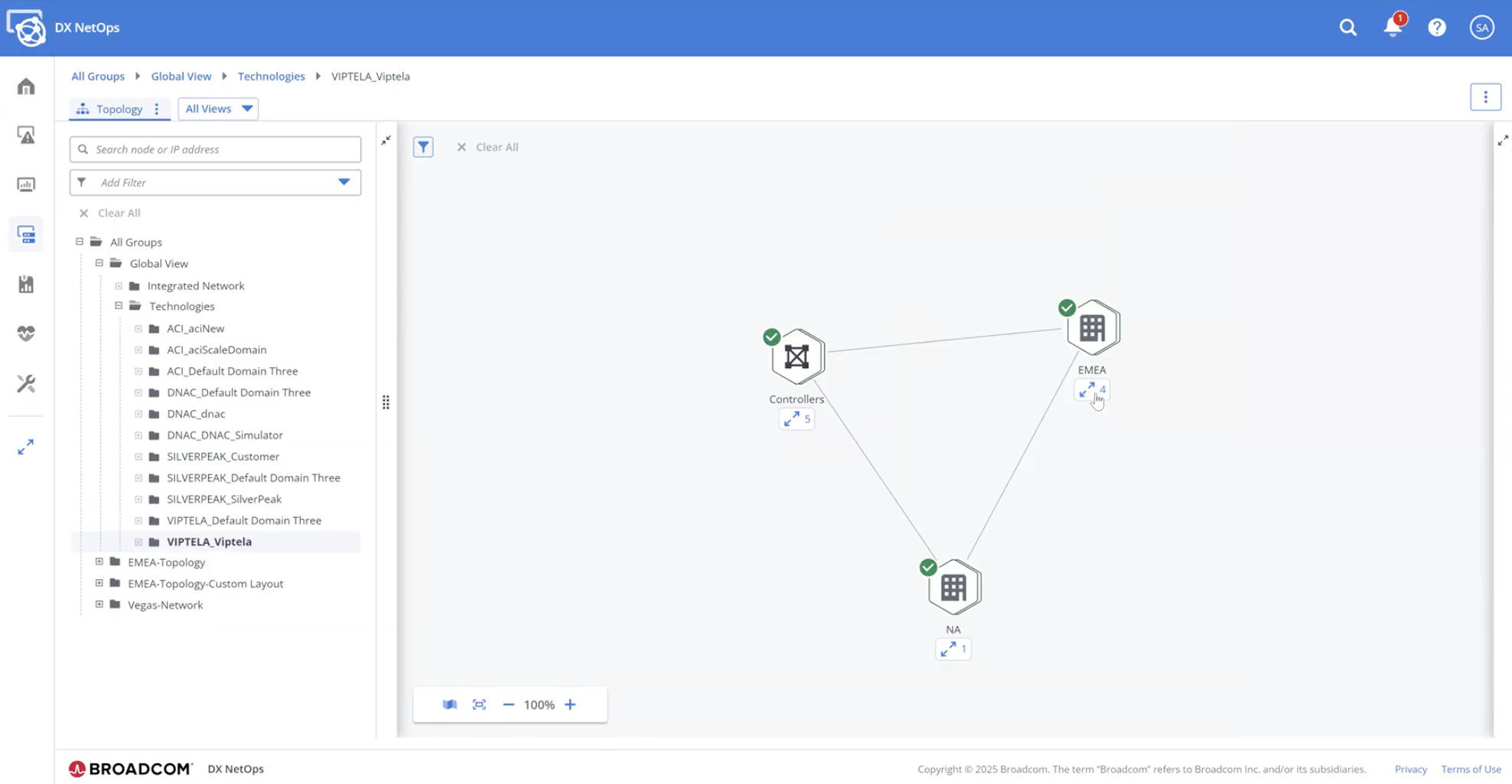
And it doesn’t stop with Viptela—DX NetOps Topology supports Cisco ACI, Cisco Catalyst Center, VMware NSX, and more.
Conclusion
Today, networks are more dynamic, more complex, and more business-critical than ever. Your tools should be up to the task. DX NetOps Topology gives you the scalable visibility, intuitive workflows, and actionable insights you need to run your network with confidence. To learn more, be sure to view our recent Small Bytes webcast, A Comprehensive Overview of DX NetOps Topology.

Sandeep Tiwary
Sandeep Tiwary is a product manager for network operational intelligence for AIOps solutions at Broadcom. He has a deep understanding of and expertise in cloud technologies, along with more than 16 years of experience building and marketing software products and services. He is currently driving customer-centric...
Other resources you might be interested in
Automic Automation: Transition to SAP RISE with Confidence
Automic Automation safeguards Clean Core architecture, mitigates SAP RISE migration risks, and unifies enterprise scheduling from mainframe to cloud.
AutoSys Workload Automation: Transition to SAP RISE with Confidence
AutoSys safeguards Clean Core architecture, mitigates SAP RISE migration risks, and unifies enterprise workload scheduling from mainframe to cloud systems.

AppNeta: Manage Alarm Rules
Learn how to create and manage alarm rules in AppNeta. Detect, isolate, and present user-impacting issues to network operations center teams.
Rally Office Hours: October 8, 2026
Find out about a new “my notifications” widget and an enhanced planned/unplanned widget. Hear about diverging axis views and upcoming cycle time widgets.

Going Off-Road: How We Bulletproofed Automic's Zero Downtime Upgrades
To ensure absolute reliability at SaaS scale, Automic Automation recently evolved its ZDU strategy.
Rally Office Hours: October 1, 2026
Explore Rally updates, including end-to-end markdown support, a new defect trend widget, an update dependency widget, and custom view migration status.
Clarity: Design Visual Layouts Using Report Designer
This course teaches you how to create new reports with the Clarity Report Designer.
Rally Office Hours: September 24, 2026
Find out about a new milestone cumulative flow diagram widget and custom view widget capacity. Get tips for handling project name changes in middleware.
Rally Office Hours: September 17, 2026
Explore Rally's new delivery confidence feature for portfolio items, hear custom view migration updates, and get expert answers to Q&A.