
|
Key Takeaways
|
|
Broadcom offers two robust solutions for network operations: DX NetOps and AppNeta. These solutions work together to provide active, passive, and infrastructure monitoring, giving you continuous, end-to-end visibility into your networks.
Our vision is to bring DX NetOps and AppNeta closer together to offer experience-driven NetOps—providing a unified solution that delivers comprehensive network visibility and network path analytics. We’ve worked toward that vision by integrating AppNeta and DX NetOps. Through this integration, you can display and analyze AppNeta data inside of DX NetOps.
Now we’re redesigning AppNeta’s interface to improve user experience and give the two products a similar look and feel. By harmonizing AppNeta’s design to be consistent with the intuitive DX NetOps interface, we will offer our customers a more seamless experience when they use these two products together.
In this blog, we’ll explore what you can expect to see in AppNeta’s new user interface design.
AppNeta's new aesthetic
We are upgrading AppNeta’s interface design to enhance the overall user experience. The updated design is clearer, more accessible, and easier to use. This interface also offers a more consistent experience when users are doing digital experience monitoring and infrastructure monitoring.
The new interface also aligns more closely with DX NetOps. The design will provide a more visually cohesive experience and facilitate seamless transitions for users of both products. The elements that we’re planning to change include:
- Colors
- Fonts
- Icons
Here’s an early look at the interface. (Note: The designs are subject to change.)
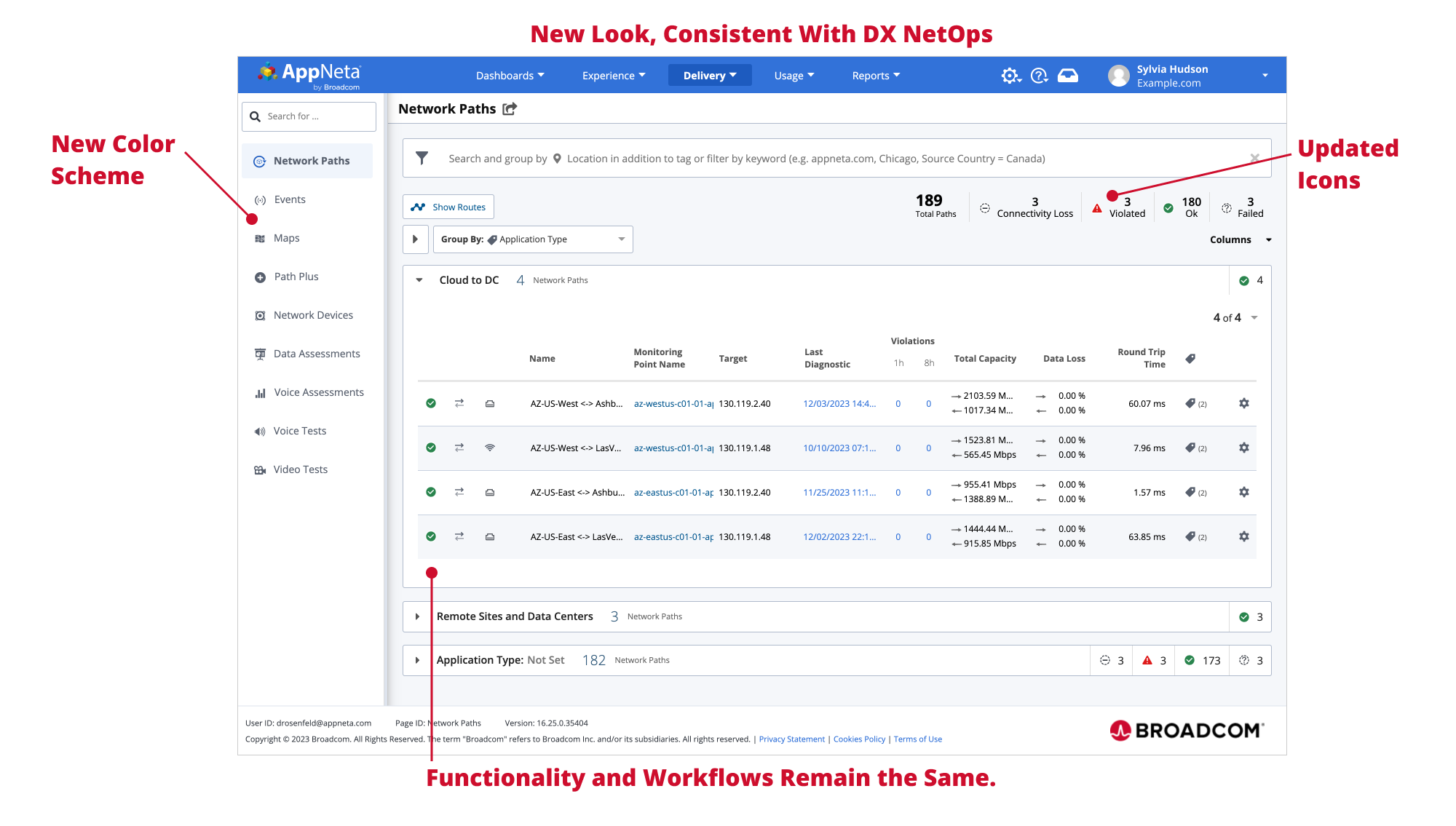
Functionality will not change
This update will preserve the existing functionality and reliability of AppNeta, with no changes to its operation. All settings and navigation will stay the same, including:
- Workflows. No alterations have been made to monitoring workflows. You will use AppNeta the same way as before.
- Configuration options. The existing configuration options will be maintained, ensuring that your customization and setup remain unchanged.
- Reports and dashboards. You will find and analyze your monitoring data in the same locations as before.
Launch timeline
We're planning to roll out the new interface in May 2024. Our team is working diligently to ensure a smooth transition, and we'll keep you updated through its launch.
Want to learn more about using AppNeta and DX NetOps together? Check out our Small Bytes session on how to use AppNeta data to create custom network delivery experience dashboards in DX NetOps.

Sarbdeep Singh
Sarbdeep Singh holds the position of product manager for the network operational intelligence team. Bringing over 16 years of expertise in the network/system management domain, he adeptly navigates the intricate landscape of NetOps solutions, enhancing overall efficiency and performance.
Other resources you might be interested in

AAI v26.0 - Linux Standalone Upgrade
Learn how to upgrade a standalone AAI installation on Linux from version 24.4.x to 26.0. Find out about updated configuration and log structures.
Automic Automation v26 Standard Administration – Agents
This course covers two agent administration topics in Automic Automation version 26 (Standard): Centralized Agent Upgrade (CAU) and Agent authentication.
Automic Automation V26 Standard Administration - General Topics
This course provides Automic Automation v26 administrators with a direct, technical breakdown of core system configuration and maintenance tasks.
Automic Automation V26 Standard Administration - Advanced Processes
This course covers the Automation Engine (AE) server processes in Automic Automation version 26 (Standard).
Automic Automation V26 Standard Administration - Functional Security
This course covers the administration of functional security in Automic Automation version 26.
Rally Office Hours: October 22, 2026
Find out about the GA of multi-column sorting. Learn more about tracking physical resources, cycle time widgets, and work rules for sprint additions.
Automic Automation: Transition to SAP RISE with Confidence
Automic Automation safeguards Clean Core architecture, mitigates SAP RISE migration risks, and unifies enterprise scheduling from mainframe to cloud.
AutoSys Workload Automation: Transition to SAP RISE with Confidence
AutoSys safeguards Clean Core architecture, mitigates SAP RISE migration risks, and unifies enterprise workload scheduling from mainframe to cloud systems.
AppNeta: Manage Alarm Rules
Learn how to create and manage alarm rules in AppNeta. Detect, isolate, and present user-impacting issues to network operations center teams.