
|
Summary
|
|
Rally's Customizable Portfolio Item Flow States (PIFS) solve the enterprise Agile paradox. With this capability, individual teams can define unique workflows while executives maintain high-level visibility. By mapping custom local states to master parent states and applying automated guardrails, teams can reduce reporting overhead and accelerate value delivery. Key Takeaways
|
In the world of enterprise Agile, we face a persistent paradox: How do we empower individual teams to establish their own unique processes, while ensuring leadership maintains a clear, consistent view of the entire organization’s progress? For a long time, the answer was a compromise. Either teams were forced into a "one-size-fits-all" workflow that didn’t quite fit anyone, or leaders were left squinting at fragmented data, trying to manually translate the status of dozens of different teams into a single executive report.
With the introduction of Customizable Portfolio Item Flow States (PIFS) in Rally, we offer a solution that emphasizes both team autonomy and executive visibility. This capability delivers a real-time status translation engine that bridges the gap between team-level execution and executive-level visibility.
The architecture of autonomy: Inheritance and mapping
By default, every project in Rally "inherits" its flow states from the project directly above it. This ensures that, out of the box, everyone is speaking the same language. However, we know that a mobile development team and a backend infrastructure team rarely work in the exact same way.
The new PIFS capability allows teams or "release trains" (teams of teams) to enable custom states. A team or train can create up to 20 unique flow states that mirror their actual value delivery workflows. To maintain organizational alignment, each of these custom states is "mapped" to a master state in the parent workspace.
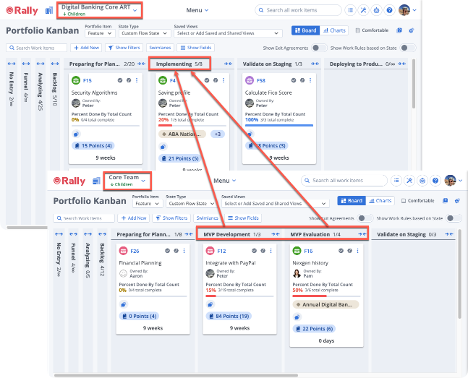
Figure 1: An example of how specific team-level states, like Development and Evaluation, roll up into a single Implementing state for the parent train.
Imagine a scenario in which a release train uses a single Implementing state. One of its teams might require a more granular workflow consisting of MVP Development and MVP Evaluation. By mapping all three of these local states back to the parent’s Implementing column, the team gets the precision they need for execution, while the train level sees a consolidated view of work moving forward.
Promoting business value through visibility
This isn't just about making the boards look pretty; it's about shifting the way we manage value delivery. Here are the primary business benefits we see when organizations move toward customized flow states:
1. Real-time status translation
Perhaps the most significant "hidden" cost in large organizations is the time managers spend manually translating team-level updates into executive presentations. Because Rally physically ties these flow states to the project hierarchy, that translation now happens automatically. When a developer moves a card to "Beta" at the team level, it can automatically appear as "Measuring" on an executive’s high-level portfolio board.
2. Respecting the "Definition of Done"
Agile is built on the principle of respecting the people doing the work. By allowing custom flow states, we respect each team's unique Definition of Done (DoD). We no longer force a "one-size-fits-all" process on teams with vastly different technical requirements.
3. Seamless scoping
Rally is highly sensitive to project scoping. Leaders can scope to the very top of the project tree (the Enterprise level) to see a clean, aggregated Kanban board representing work from dozens of teams. As they traverse down the hierarchy, leaders can visualize more granular processes without losing the context of the strategic initiatives those tasks support.
Strengthening working agreements
Customizing the Portfolio Kanban isn't just about the columns; it's about the rules that govern the flow of work. PIFS allows us to define several "guardrails" specific to teams and trains that ensure quality and predictability:
-
Work-in-progress (WIP) limits: We can define a maximum number of cards allowed in a column at any given time. This helps development teams limit interruptions and the cognitive load of context switching. If a limit is exceeded, the header turns red, providing an immediate visual signal that the team needs to focus on finishing work rather than starting new items.
-
Exit agreements: These act as a team's internal commitment to quality. They document the specific criteria—such as "Features integrated and deployed to staging"—that must be met before a card can move to the next column. These agreements resolve misunderstandings between teams and stakeholders, creating a more trusting relationship.
-
Card age rules: We can configure cards to display their "age" after a certain number of days (for example, five days). This highlights stalled work items that might require leadership intervention or additional resources.
Implementation considerations for administrators
Before implementing this capability, administrators should take pains to review the base workflow states for each type of Portfolio Item in the workspace. By ensuring that the states configured for the workspace are the minimum valuable states and removing any unneeded ones, teams will improve executive visibility and reporting.
To take advantage of these features, workspace administrators must first determine if they want to delegate control. By navigating to Setup > Workspaces & Projects > Your workspace > Details, administrators can enable the toggle for Project Admins Can Manage Portfolio Item Flow States. If not enabled, then only Workspace and Subscription Administrators can manage flow states.
Once enabled, project administrators can access the Portfolio Kanban Settings via the gear icon on the board. From there, they can:
-
Add or rename columns: Tailor the board to the team's specific terminology.
-
Map to parent states: Ensure every local state rolls up to a valid ancestor state.
-
Define WIP and age rules: Set the operational parameters for the board.
It is important to note that making these changes is easiest during the initial setup. Moving or deleting columns becomes more difficult once cards are associated with them. If a parent state mapping is changed while work items are in that column, Rally will update the state of every item in that column to match the new mapping—which may lead to unintended data shifts.
Conclusion
The new Portfolio Kanban Flow State capability represents a major leap forward in how we manage complex hierarchies. By allowing for local optimization through custom states while maintaining global alignment through parent mapping, we enable a truly "bottom-up" flow of information.
We encourage all our project and workspace administrators to review their current boards. Are your columns truly reflecting the way your teams work, or are you still using inherited defaults that don't quite tell the whole story? By taking the time to configure these flow states, we can improve data quality, reduce manual reporting overhead, and ultimately accelerate the delivery of value across the entire enterprise.
To learn more, see our “Customizable Portfolio Item Flow States” announcement.

Eric Nash
Eric Nash is an Agile expert and Rally resident advisor who is happiest when he can coach and share his passion with others, whether it’s working on digital and Agile transformations, junior golf or fishing. When not on the water he works with organizations in industries from manufacturing to publishing to defense...
Other resources you might be interested in

Rally Office Hours: September 24, 2026
Find out about a new milestone cumulative flow diagram widget and custom view widget capacity. Get tips for handling project name changes in middleware.
Rally Office Hours: September 17, 2026
Explore Rally's new delivery confidence feature for portfolio items, hear custom view migration updates, and get expert answers to Q&A.
Rally Office Hours: September 10, 2026
On the latest Rally Office Hours, learn more about new burn-down widgets, custom page migration updates, technical Q&A, and Broadcom community events.
Rally Office Hours: September 3, 2026
Review the latest Rally Office Hours summary covering the MCP Server upgrade, custom page migration updates, API tooling, Q&A, and upcoming event news.
Rally Office Hours: August 27, 2026
Explore key Rally updates for Kanban charts and saved views, get expert tips on milestone tracking, and sign up today for upcoming webinars on AI delivery.
Rally Office Hours: August 20, 2026
This Rally Office Hours session reveals the general availability of a Kanban board extension to the custom board widget. Get expert tips for custom views.
Rally Office Hours: August 13, 2026
This Rally Office Hours session covers upcoming product deprecations, custom view migrations, high-level reporting solutions, and workspace field updates.
Rally Office Hours: August 7, 2026
Reveals how API queries can be used for non-static values, sharing examples from templates. Looks at risk burndown charts and iteration dropdown limits.
Rally Office Hours: July 30, 2026
View this session to find out about the new query counter widget, custom list print card updates, dynamic Rally-to-Clarity mapping, and Q3 events.