
To ascertain risk, national security and intelligence professionals have long used concepts such as known knowns, known unknowns, and unknown unknowns. The idea of unknown unknowns was created in 1955 by American psychologists Joseph Luft (1916–2014) and Harrington Ingham (1916–1995). This concept continues to be used today in risk assessments and is applicable to technology.
The unknown unknowns are the threats and potential problems that remain invisible until their impact manifests. When they do, they create consequences that can disrupt the status quo.
In business, and in particular in technology, the unknown unknowns pose a serious problem and often remain elusive to IT teams. As applications have become more complex, it’s become harder to track risks. Traditional application performance monitoring (APM) has focused on monitoring for known problems. You knew the performance baseline for an application, as well as expectations and performance indicators, and you’d set thresholds and static alerts to see if performance deviates. You were monitoring for known knowns. Today, this is no longer sufficient.
APM Needs to Address the Unknown Unknowns
Modern apps are extremely complex and multi-layered. You can no longer depend on monitoring for known problems. In the cloud, the application stack is so complex that issues can happen anywhere and disrupt app performance. These app disruptions can have a negative impact on the user experience, customer/user satisfaction, and even customer retention and business revenue.
But can an APM solution really monitor for unknown unknowns?
Yes, it can and here’s how. To monitor all the layers of the environment, and understand these layers and how they interact, an APM solution needs a topology model of dynamic and constantly changing environments.
Along with a topology model, a solution must have the intelligence needed to determine when a metric deviates from norms. A solution needs to be able to correlate events and anomalies and identify probable root causes, then automatically remediate the issue. An APM solution such as Broadcom’s DX APM SaaS does this with a rich topology based on our strengths in monitoring applications, infrastructures, and networks. We have a built-in, automated remediation engine that leverages the topology and helps customers automatically remediate issues when they occur.
DX APM SaaS is capable of dynamically monitoring for unknown unknowns, enabling businesses to elevate their level of observability and create confidence that they won’t run into surprises.
What does this look like? Here’s a scenario to illustrate. In this fictional scenario, we’ll demonstrate how John, an SRE/DevOps engineer, can use our DX APM SaaS solution to query across captured instrumentation data to examine, correlate, and derive insight or uncover unknown unknowns (observability) from this data.
1. John is notified of a performance problem with the ACME Business Service. It appears that several users are unable to log into the site. John logs into DX APM SaaS and opens up the experience view for service health and notices that the service is indeed “Red.” Next, he drills down into service health.
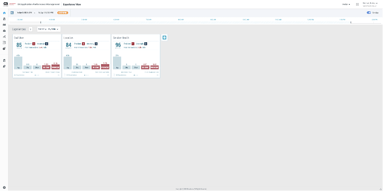
2. He sees that the activity service application is reporting a problem with several failed transactions. He sees that APM has already detected a problem and is reporting an issue with the authenticator service. He clicks on the problem to view the associated details in a problem analysis notebook view.
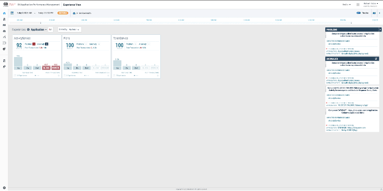
3. In the notebook view, John views the problem details and notices that there are issues reported with several different technology tiers of the application stack.
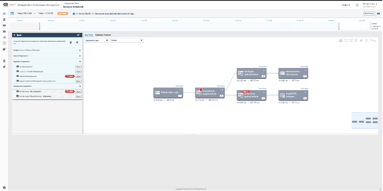
4. He notices that the system has identified the authenticator service as problematic and selects the service.
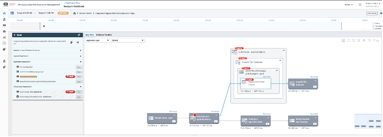
5. He opens up the traces tab to take a look at the automatically collected transactions and sees several error traces. He opens the first trace and sees that the request from the first service has timed out with a 400 error.
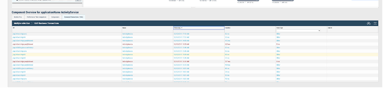
6. At the same time, he also observes that only some transactions are timing out while others are successful.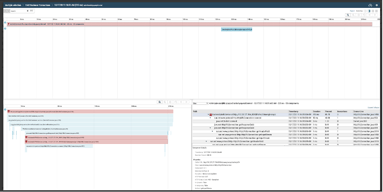
7. He wonders what could have changed with the application and brings up the timeline view to see change events. He notices a new version of the authenticator service was released to production last night. The new version was re-implemented as a microservice in a new technology stack. Furthermore, the specific team that developed the new service decided to instrument it with OpenTracing for their observability needs. Could there be an issue with the new service?
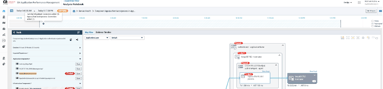
8. He turns his attention to the alarms. The system is reporting an abnormally high CPU utilization on the new service. In addition, the system has also detected a change in the deployment configuration, with the number of replicas going down from six to one. This is obviously not right: the new service was checked in with an incorrect deployment configuration. This error caused the service to be under-provisioned, resulting in performance issues.
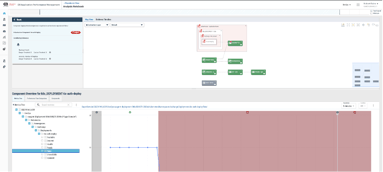
As you can see, DX APM SaaS automatically detects issues via dynamic baselines and correlates these seemingly unrelated sets of events, both performance and change events, together in a unified topology. This helps John quickly diagnose the problem, down to the specific line of code. As a result, the solution converts unknown unknowns into known knowns.
Learn more about how DX APM SaaS can help you address unknown unknowns.

Nishant Kabra
Nishant is a Product Manager for Application Performance Management. He is passionate about releasing market-leading solutions covering full-stack observability for applications.
Other resources you might be interested in

AAI - Creating and Publishing AI-powered Data Insights
Learn how to create AI-powered data insights using natural language prompts, refine the generated results, and publish useful insights.
AAI - Configuring the Cost Model for Chargeback Reporting
Learn how to configure the Cost Model in AAI by defining cost centers, associating jobs with those cost centers, and entering annual cost factors.
Clarity: Strategic Workforce Planning with the Staffing Workspace
This course blends strategic portfolio management (SPM) concepts with Clarity Staffing. See how to use the product and make better business decisions.
Rally Office Hours: August 20, 2026
This Rally Office Hours session reveals the general availability of a Kanban board extension to the custom board widget. Get expert tips for custom views.
ValueOps ConnectALL 101
This is an introductory course for new ConnectALL administrators and implementation teams.
AAI: Monitoring Global Shift Operations with Jobstream Runs Views
Focuses on live operational triage, teaching operators to track real-time executions, identify "Red-Zone" failures, and drill down to resolve bottlenecks.
AAI: Triaging Incidents via the Gantt View
See how to use the Gantt Command Center to isolate failures and restore pipelines. Trace dependency paths, evaluate delays, and inspect job properties.
AAI: Tracking Trends & Runtimes with Jobstream Run Details
Learn how to analyze multi-week historical performance using Actual, Relative to SLA, and SLA Graph views. See how to spot and prove performance issues.
Rally Office Hours: August 13, 2026
This Rally Office Hours session covers upcoming product deprecations, custom view migrations, high-level reporting solutions, and workspace field updates.