
|
Key Takeaways
|
|
Upgrading a large DX NetOps environment with multiple components across distributed infrastructure can be a challenging endeavor. Network interruptions, time-consuming validations, and the need for detailed diagnostics have been persistent pain points for administrators. With the release of version 25.4.6 of the DX NetOps Upgrade Automation Tool, we've addressed these challenges head-on. This release introduces powerful new capabilities that fundamentally change how you approach upgrade operations.
In this blog post, we'll explore some game-changing features that make upgrade operations more resilient, transparent, and efficient:
- The “-continue” flag for resuming interrupted operations.
- An enhanced “-debug” mode for comprehensive diagnostics, intelligent state persistence, and automatic timestamp tracking.
- An environment-based configuration for multi-environment management.
Let's dive in.
Feature 1: Never lose your progress again
The problem we solved
Picture this: You're running preflight validation across 15 DX NetOps components in your production environment. After 45 minutes of successful validation, a network hiccup occurs, and your preflight operation terminates. In previous versions, you'd have to start from scratch, re-validating all 15 components—wasting time and network bandwidth, and potentially extending your maintenance window.
The solution
The new “-continue” flag allows you to resume interrupted preflight operations exactly where they left off. When you specify “--continue”, the tool preserves your “runtime-vars.yml” state file, which contains all the progress information from your previous run.
./preflight-all-remote.sh --continue
Each component that successfully completes preflight gets a processing flag set (like “preflight_da_processed: true”). When you resume with “--continue”, the orchestration engine automatically skips these completed components and picks up where you left off.
Why does this matter?
The new “-continue” flag delivers these advantages:
- Time efficiency: Eliminate redundant validation of successfully completed components.
- Resource conservation: Reduce network traffic and system load.
- Fault tolerance: Gracefully recover from transient failures.
-
Operational flexibility: Pause and resume operations as needed during maintenance windows.
The “-continue” flag transforms upgrade operations from an all-or-nothing proposition into a resilient, checkpoint-based process.
Feature 2: See everything—enhanced debug mode
Frustration of limited visibility
When an upgrade fails, the most critical question is: "Why?" In the past, a standard output might show you that a task failed, but not the underlying cause. Was it a missing file? A permission issue? A configuration problem? You'd often find yourself in a trial-and-error cycle, trying to diagnose the issue with limited information.
Enter enhanced debug mode
The “-debug” flag (or “--debug”) enables Ansible's maximum verbosity level (“-vvv”), giving you unprecedented visibility into every aspect of the upgrade process. This isn't just more output; it's a complete diagnostic toolkit.
./preflight-all-remote.sh --debug
What do you get?
When you run “./preflight-all-remote.sh --debug” or “./upgrade-all-remote.sh --debug”, you'll see these details:
- Exact commands executed: Every command run on remote hosts with full parameters.
- Variable values: All Ansible variables and facts at each execution step.
- Connection details: SSH connection information and remote command execution context.
- Module internals: How Ansible modules process your tasks.
- Error context: Detailed stack traces showing exactly where and why failures occur.
When to use “--debug” mode
- Initial troubleshooting: When something unexpected happens.
- Support ticket creation: Provide comprehensive logs to support teams.
- Learning and understanding: See exactly how the automation works.
- Complex environments: Multi-datacenter deployments with intricate configurations.
Feature 3: Smart state management
The evolution of state persistence
One of the most significant improvements we have implemented is the intelligent state management system. The tool now maintains a comprehensive “runtime-vars.yml” file that acts as the "memory" of your upgrade operations.
What gets saved
The state file captures everything important about your upgrade process. Here’s a sample output:
...
da_version_from_registry: 25.4.6.1846
da_version_3bits_from_registry: 25.4.6
da_version_3bits_from_yaml: 25.4.7
da_module_name: DA
da_host_eval_result: True
preflight_da_processed: True
preflight_da_completed_at: 2026-03-12T17:01:48+0000
dc_version_from_tar: 25.4.7
dc_tar_file_name: CA_DA-25.4.7.1856-Linux.tar.gz
dc_tar_file_location: /installers/CA_DA-25.4.7.1856-Linux.tar.gz
dc_product_location: /opt/IMDataAggregator
dc_version_from_registry: 25.4.6.1846
dc_version_3bits_from_registry: ['25.4.6.1846']
dc_ip_addr: netops-qualys-daproxy.netops.broadcom.net
dc_protocol: https
preflight_run_complete: True
preflight_dc_processed: True
preflight_dc_completed_at: 2026-03-12T17:06:34+0000
preflight_run_complete: True
preflight_netops_completed_at: 2026-03-12 17:07:41 UTC
The power of persistent state
This state information enables several powerful capabilities:
- Idempotent operations: Re-run operations safely without redundant work (in combination with the flags like “–continue”).
- Cross-session persistence: State survives script termination and system restarts.
- Fact reuse: Previously discovered information eliminates redundant queries.
- Intelligent skipping: Components already processed are automatically skipped.
Feature 4: Timestamp tracking—your audit trail
The compliance challenge
In regulated industries, audit trails aren't optional; they're mandatory. Organizations need to know exactly when each component was validated and upgraded. However, manual record-keeping is error-prone and time-consuming.
Automatic timestamp generation
The new DX NetOps Upgrade Automation Tool automatically records ISO8601-formatted timestamps for all major operations. These timestamps are stored in “runtime-vars.yml” and provide a complete audit trail.
What gets timestamped
The tool records timestamps for the following elements:
- Overall preflight completion: “preflight_netops_completed_at”.
- Component-specific preflight: “preflight_portal_completed_at”, “preflight_da_completed_at”, and so on.
Timestamp format
All timestamps use ISO8601 format with UTC timezone:
Format: YYYY-MM-DDTHH:MM:SS+HHMM
Example: "2025-01-15T10:30:45+0000"
This standardized format ensures consistency and makes temporal analysis straightforward.
Feature 5: Management of multiple environments made simple
Organizations running DX NetOps typically manage multiple environments, including development, QA, staging, and production. Sometimes these environments span multiple data centers or regions. Each environment has its own inventory file, variables, and runtime configurations.
Previously, switching between environments introduced these requirements:
- Manually editing “inventory.remote” and “variables.yml”.
- Remembering which configuration files belong to which environment.
- Risk of accidentally running operations against the wrong environment.
- Downloading all the required binaries from the Broadcom support portal.
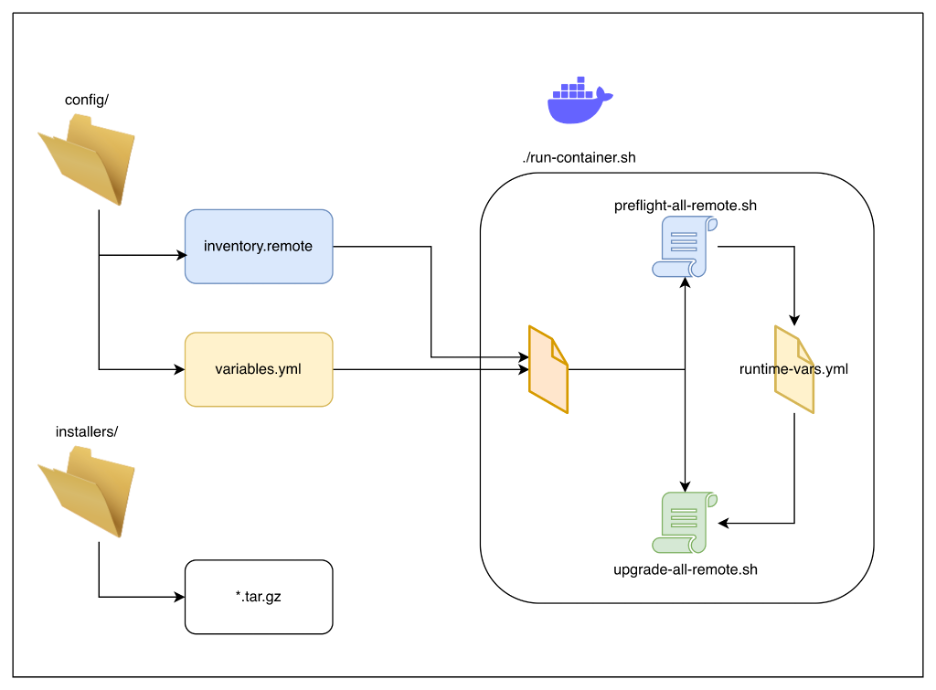
Figure 1. Typical flow
The solution: ENV parameter
Version 25.4.6 introduces environment-based configuration through the “ENV” parameter. Simply prefix your command with “ENV=’environment_name’” and the tool automatically loads the correct configuration files. This parameter offers these capabilities:
- Define a unique set of configurations per environment.
- Choose which environment you want to interact with.
- Avoid confusion and establish clear separation between each environment.
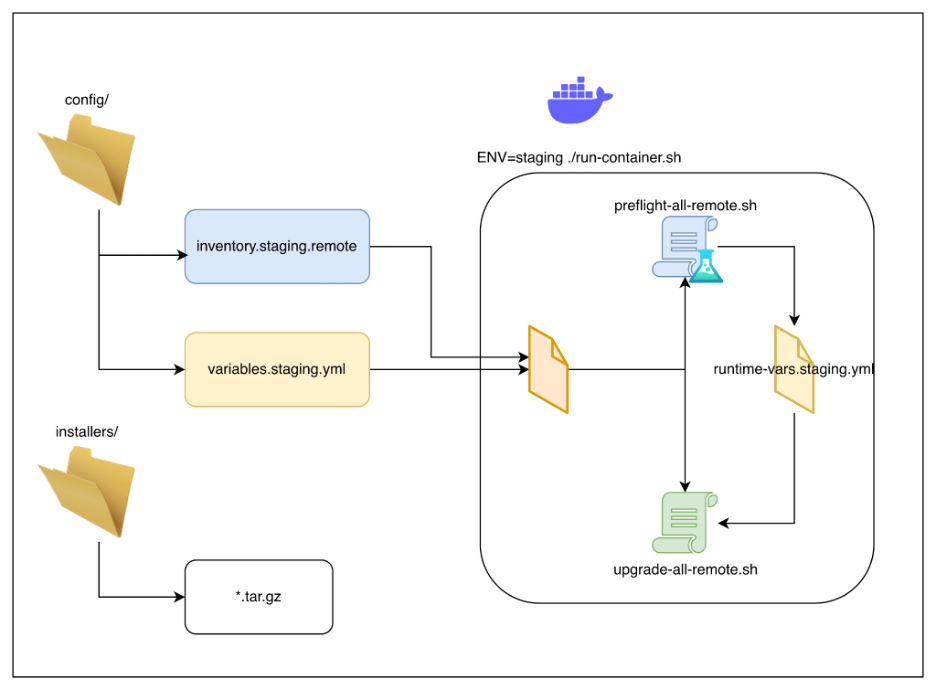
Figure 2. Staging environment. Example: ENV=staging ./run-container.sh
How does it work?
Environments are identified by a short name (such as qa, prod, or stage). When you specify an environment, the tool follows a clear naming convention:
|
Folder/File |
Purpose |
|
config/inventory.<env>.remote |
Host and connection details for that environment. |
|
config/variables.<env>.yml |
Variables and configurations for the DX NetOps family of products, such as username, remote_installer_dir, da_port, and so on. |
|
runtime-vars.<env>.yml |
This is a runtime file generated by the tool: Contains the state, versions, timestamps, and other details discovered as part of the preflight or the upgrade process. |
|
netopsInstall/<env>/ |
Reports all the logs generated for the selected <env>. |
The tool never mixes two environments: Each name has its own inventory, variables, runtime state, and reports.
Step 1: Prepare your directory
After installing the Upgrade Automation package, your directory usually looks like this:
netops-deployment-tools-dist-25.4.6-RELEASE/
├── config/
│ ├── ansible.cfg
│ ├── inventory.remote
│ └── variables.yml
├── installers/
├── netops-deployment-tools-image-25.4.6-RELEASE.tar.gz
├── netops-deployment-tools-package-25.4.6-RELEASE.tar.gz
├── run-container.sh
└── tmp/
Step 2: Add a new environment
Under config/, add one inventory and one variables file per environment. Use the naming convention above.
Example: QA and production
- config/inventory.qa.remote – QA hosts
- config/variables.qa.yml – QA variables
- config/inventory.prod.remote – production hosts
- config/variables.prod.yml – production variables
Keep config/inventory.remote and config/variables.yml as the default (or another environment) if you like.
.
├── config/
├── ansible.cfg
├── inventory.qa.remote
├── inventory.remote
├── variables.qa.yml
└── variables.yml
Environment names can use letters, numbers, and underscores (for example, qa, prod, env_1). Avoid spaces or special characters.
Step 3: Start the container with an environment
ENV=qa ./run-container.sh
The script will:
- Load the Docker image.
- Mount config/inventory.qa.remote and config/variables.qa.yml into the container (when those files exist).
- Pass NETOPS_ENV=qualys into the container.
- Start a shell inside the container.
[saurabh@machine netops-deployment-tools-dist-25.4.6-RELEASE]$ ENV=qa ./run-container.sh
PWD=
Loading netops-deployment-tools-image into docker
Emulate Docker CLI using podman. Create /etc/containers/nodocker to quiet msg.
Getting image source signatures
Copying blob 989e799e6349 skipped: already exists
Copying blob 5f70bf18a086 skipped: already exists
Copying blob 4866a7b0f48d skipped: already exists
Copying blob 5f70bf18a086 skipped: already exists
Copying blob 05d87dc20ceb skipped: already exists
Copying blob 8901b02b0d7f skipped: already exists
Copying blob c34c9321e781 skipped: already exists
Copying blob 0794b042c733 skipped: already exists
Copying blob 4470d18955b9 skipped: already exists
Copying blob 5f70bf18a086 skipped: already exists
Copying blob 28a85663166e skipped: already exists
Copying config ff51ec446b done |
Writing manifest to image destination
Loaded image: com.broadcom.netops/netops-deployment-tools:latest
Ansible playbook folder on docker container=netops-deployment-tools-package-25.4.6-RELEASE
Using environment 'qa': config/inventory.qa.remote
Creating tmp directory for logs
Starting container netops-deployment-tools
Running as saurabh
[INFO] Environment 'qa' will be passed to container. Scripts will auto-detect it.
Emulate Docker CLI using podman. Create /etc/containers/nodocker to quiet msg.
9c512f63fe07:/opt/netops-deployment-tools-package-25.4.6-RELEASE#
Look out for a message, such as the following:
[INFO] Environment 'qa' will be passed to container. Scripts will auto-detect it.
Step 4: Run preflight or upgrade
Once NETOPS_ENV is set, the scripts automatically use the right inventory and variables.
Preflight for the selected environment:
./preflight-all-remote.sh
Post preflight, you can run the upgrade using this command:
./upgrade-all-remote.sh
This will use:
- inventory.qa.remote
- variables.qa.yml
- runtime-vars.qa.yml (created/updated by the tool)
- Reports under netopsInstall/qa/
You can still pass options (e.g. --debug, --continue, -y).
Step 5: Switch environments by restarting the container
To run against another environment (such as production), exit the container and start it again with a different ENV:
exit
ENV=prod ./run-container.sh
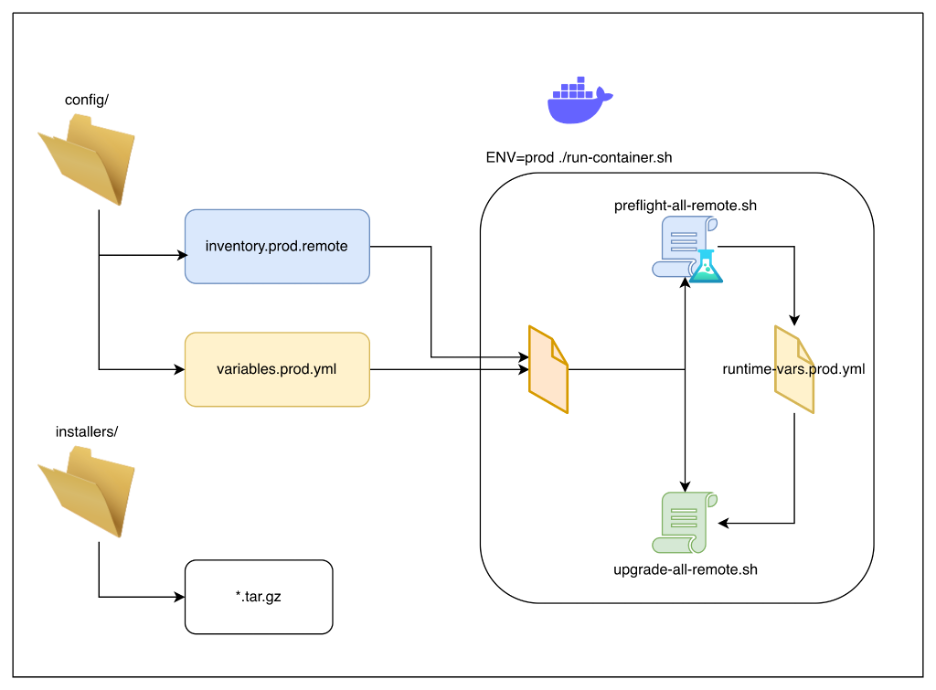
Figure 3. Running for ENV=prod
Note:
-
If you launch and the environment-related files are not present, preflight and upgrade will fail, given the corresponding inventory file is not present. Example: ENV=abc ./run-container.sh will launch the container but when the preflight is run it will fail, and issue the following message:
[ERROR] Inventory file for environment 'abc' not found: inventory.abc.remote
Conclusion
Version 25.4.6 of the DX NetOps Upgrade Automation Tool is a step-change in operational efficiency and reliability. With this version, we've made upgrading DX NetOps more resilient and easier than ever before. This release enables you to achieve these objectives:
- Transform upgrade operations with the fault-tolerant “-continue” flag.
- Gain deep visibility with “-debug” mode.
- Maintain a complete audit trail with automatic timestamp tracking.
- Simplify complex deployments with the new ENV parameter for configuring multiple environments.
Upgrade to version 25.4.6 today to make your next deployment seamless. To learn more about how our comprehensive network observability solutions can transform your infrastructure, visit the DX NetOps product page.

Saurabh Sharma
Saurabh Sharma is an Engineering Professional with two decades of expertise spanning Security, NetOps, and Agile methodologies. He is passionate about fostering innovation, mentoring, and driving operational excellence.
Other resources you might be interested in
Rally Office Hours: October 8, 2026
Find out about a new “my notifications” widget and an enhanced planned/unplanned widget. Hear about diverging axis views and upcoming cycle time widgets.

Going Off-Road: How We Bulletproofed Automic's Zero Downtime Upgrades
To ensure absolute reliability at SaaS scale, Automic Automation recently evolved its ZDU strategy.
Rally Office Hours: October 1, 2026
Explore Rally updates, including end-to-end markdown support, a new defect trend widget, an update dependency widget, and custom view migration status.

Clarity: Design Visual Layouts Using Report Designer
This course teaches you how to create new reports with the Clarity Report Designer.
Rally Office Hours: September 24, 2026
Find out about a new milestone cumulative flow diagram widget and custom view widget capacity. Get tips for handling project name changes in middleware.
Rally Office Hours: September 17, 2026
Explore Rally's new delivery confidence feature for portfolio items, hear custom view migration updates, and get expert answers to Q&A.
Rally Office Hours: September 10, 2026
On the latest Rally Office Hours, learn more about new burn-down widgets, custom page migration updates, technical Q&A, and Broadcom community events.
Rally Office Hours: September 3, 2026
Review the latest Rally Office Hours summary covering the MCP Server upgrade, custom page migration updates, API tooling, Q&A, and upcoming event news.
AAI v26.0 Container Deployment
This foundational training course focuses on modernizing enterprise workload analytics across OpenShift and Kubernetes environments.