
Human operators utilizing traditional network monitoring software with methods like SNMP, ping, or flow tracking are still limited to diagnosis and triage issues within the four walls of the on-premise data center. But with increased adoption of cloud, SD-WAN and “work from anywhere,” application workloads are getting more distributed and creating network monitoring visibility gaps.
As today’s networks become more complex, traditional network monitoring software approaches create real-time blind spots while increasing mean time to resolution (MTTR). The reason is attributed to the volume, velocity, and veracity of data generated by these modern network elements, which can’t be processed by humans anymore and require algorithmic or machine processing to be effective and efficient.
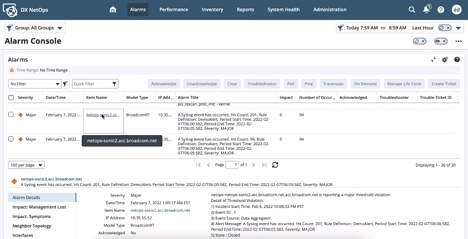
Figure 1: Unified NetOps portal for one-click log analysis and triage via alarm console
What’s the Solution?
Enterprise Management Associates (EMA) reports that 60% of large organizations consume multiple automation technologies, often from different vendors. An EMA Research survey also found that three quarters of those organizations have their critical business processes spanning these technologies. And, over a third reported significant challenges in delivering services through those technologies.
To make the triaging process more effective, the solution here is to harness the power of machine learning algorithms on top of all this collected data, providing intelligent augmentation for network operators. Historical analysis of enterprise network data, correlation of a multitude of data series, detection of trends and anomalies, as well as the realization of intent-based networking will be a reality this year.
Introducing DX NetOps Insights
DX NetOps Insights is a SaaS-based service that compliments traditional network monitoring with AI insights, improving triage time and accuracy. DX NetOps Insights helps correlate network monitoring data via faults, performance flow, inventory, metrics, topology, or logs, all together in real time. Instead of simply depending upon human knowledge, know-how of environment, or experience, DX NetOps Insights processes data via time-tested algorithms from our 30-plus years of network monitoring experience, generating insights to network operators within the unified NetOps portal.
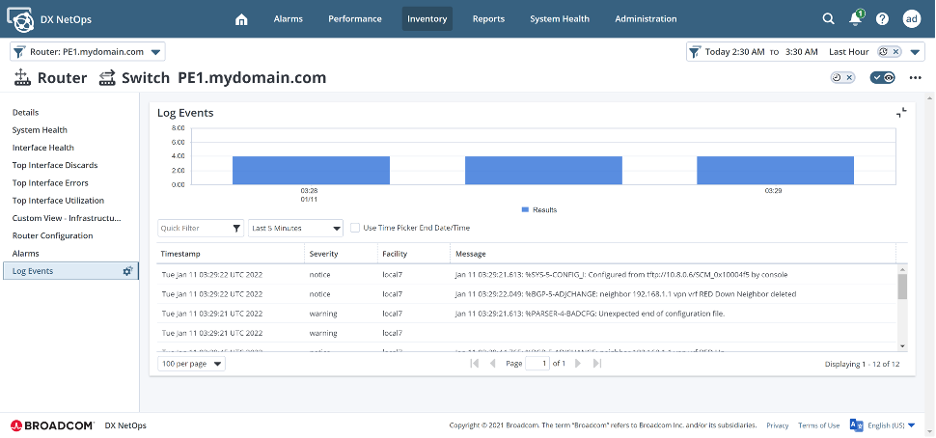
Figure 2: DX NetOps Insights enables operators to reduce meet time to resolution (MTTR) with contextual log visualizations
Key Use Cases
Log Analytics
It’s well-known that if you manage a network, every network device generates a large volume of logs. These logs are extremely important and narrate a story about the sequencing of events that have happened within your network. They are critical to helping you easily understand network activities, user actions, or security breaches.
DX NetOps Insights log analytics enables operations to contextually correlate the right set of logs and inspect millions of log lines within a few clicks on the NetOps portal. Our network monitoring software also helps you proactively monitor logs for interesting critical patterns. Additionally, correlating the right set of logs with the alert allows quicker triage by reducing resolution time from hours to minutes.
Key Highlights
- Unified tool and single-click insights within the realm of NetOps Portal
- Contextual log viewing
- Log pattern monitoring
- Kibana interface for historical log forensic
- Policy based retention and on-demand data purging
- $0 CapEx, via managed SaaS service
Future Use-Cases
Threshold Advisor
Organizations mostly rely on the knowledge and experience of network operators to define correct thresholds, then adjust and fine-tune them over time. Very often this process results in too many false positives on spurious events, while missing suspicious behaviors that could be under the surface. DX NetOps Insights’ embedded analytics will help quickly find anomalous and sustained transfer rates through a specific network device like a router to avoid downtime or SLA breaches.
Key Highlights
- Annotate Threshold violation alarms with band details
- Nominate metrics for Anomaly processing
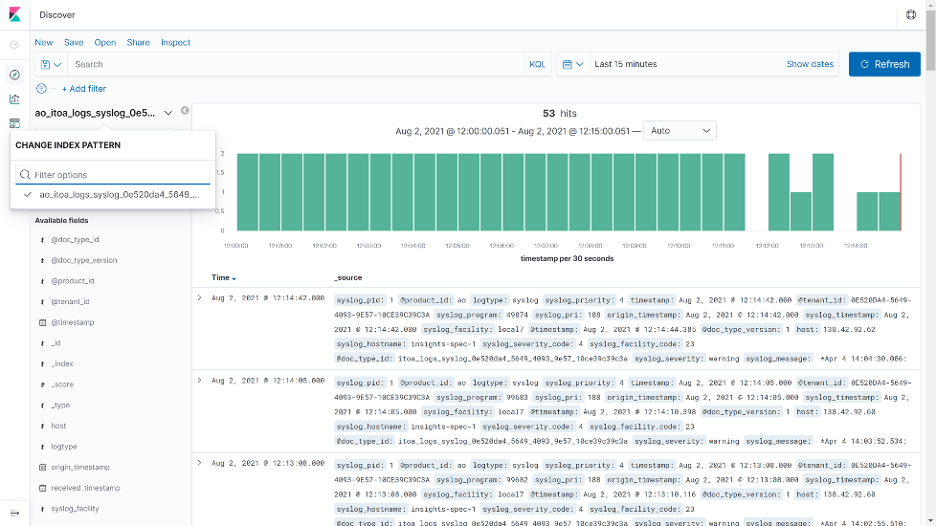
Figure 3: Kibana interface for historical forensic of logs and network events improves root cause analysis
Capacity Analytics
Very often, organizations encounter network performance issues due to excessive capacity utilization and then take a reactive approach to increasing bandwidth needs. DX NetOps Insights capacity analytics enable network engineers within network monitoring software groups to monitor the current utilization, then forecast, plan, and manage existing network resources to help mitigate any unplanned or unexpected network degradation or outage.
Key Highlights
- Showcase Capacity Trends in context of network inventory & groups
- Operators should see ‘hottest’ inventory
Conclusion
World-class network visibility means painting a complete monitoring picture of network performance. DX NetOps Insights from Broadcom Software enables IT operations teams to collect and analyze every metric important to resilient network delivery. This allows organizations to make intelligent decisions about the root cause of any performance issue related to a specific device, interface, or virtual network function.

Sandeep Tiwary
Sandeep Tiwary is a product manager for network operational intelligence for AIOps solutions at Broadcom. He has a deep understanding of and expertise in cloud technologies, along with more than 16 years of experience building and marketing software products and services. He is currently driving customer-centric...
Other resources you might be interested in

AAI v26.0 - Linux Standalone Upgrade
Learn how to upgrade a standalone AAI installation on Linux from version 24.4.x to 26.0. Find out about updated configuration and log structures.
Automic Automation v26 Standard Administration – Agents
This course covers two agent administration topics in Automic Automation version 26 (Standard): Centralized Agent Upgrade (CAU) and Agent authentication.
Automic Automation V26 Standard Administration - General Topics
This course provides Automic Automation v26 administrators with a direct, technical breakdown of core system configuration and maintenance tasks.
Automic Automation V26 Standard Administration - Advanced Processes
This course covers the Automation Engine (AE) server processes in Automic Automation version 26 (Standard).
Automic Automation: Transition to SAP RISE with Confidence
Automic Automation safeguards Clean Core architecture, mitigates SAP RISE migration risks, and unifies enterprise scheduling from mainframe to cloud.
AutoSys Workload Automation: Transition to SAP RISE with Confidence
AutoSys safeguards Clean Core architecture, mitigates SAP RISE migration risks, and unifies enterprise workload scheduling from mainframe to cloud systems.
AppNeta: Manage Alarm Rules
Learn how to create and manage alarm rules in AppNeta. Detect, isolate, and present user-impacting issues to network operations center teams.
Rally Office Hours: October 8, 2026
Find out about a new “my notifications” widget and an enhanced planned/unplanned widget. Hear about diverging axis views and upcoming cycle time widgets.

Going Off-Road: How We Bulletproofed Automic's Zero Downtime Upgrades
To ensure absolute reliability at SaaS scale, Automic Automation recently evolved its ZDU strategy.