
With the extension of hybrid work and the rise in popularity of remote work, IT Operations teams now spend an unsustainable percentage of their time troubleshooting. IT no longer owns and controls 100% of the delivery path of business-critical apps, so they require additional visibility to see into these networks. In order to understand end-user performance, you have to get the end-user perspective by testing from the user’s actual location. Whether users are in the office or at home, you need to measure the network paths to business-critical apps – wherever they are hosted – in the data center, the cloud, or as third party apps.
Here are some of the top highlights released over the past few months from AppNeta to combat poor visibility and long troubleshooting times for IT Ops teams:
Automate End-User Experience Visibility at Scale
AppNeta provides real time visibility into the end-to-end performance for users in hybrid and distributed work environments, and a series of upcoming improvements make this insight easier than ever:
- Automatic User Geo-Location. Knowing where a user is connecting from is critical in understanding the scope of issues and correlating issues affecting multiple users. AppNeta now automatically resolves the users WAN IP address to the geographic city they are connecting from, making the monitoring of large remote work forces easier than ever.
- Performance Indexed by Username and Hostname. All of AppNeta performance monitoring has been indexed by the username currently logged into a workstation, and the hostname of that workstation. This puts troubleshooting and reporting on performance issues in the context of the users affected without any management overhead.
- Advanced Host Information. User experience issues can be caused by issues on the user’s workstation, and AppNeta now collects details about the OS and patch level, storage system, CPU, Memory, and other key system resources automatically to expedite troubleshooting the root cause of issues on a user’s computer.
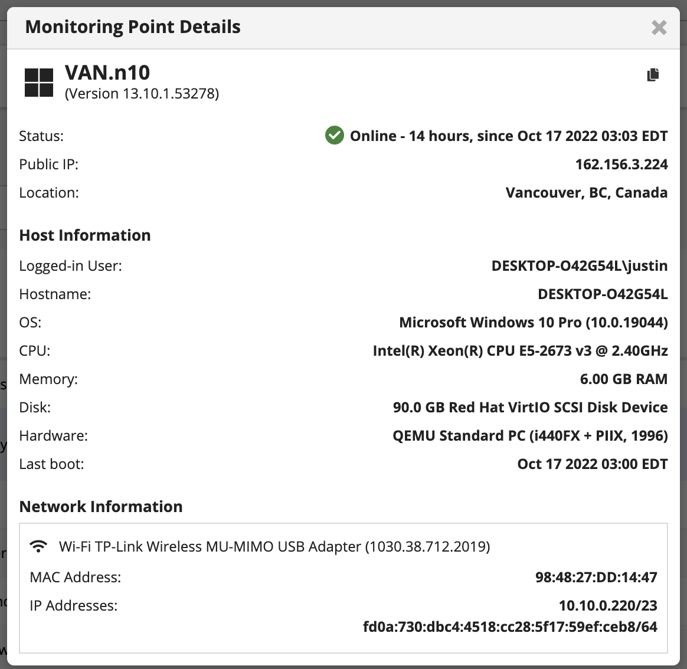
- All of these services support advanced PII controls, enabling administrators to control the collection of this information for their entire account or any subset of users to comply with local or company privacy regulations.
Web Performance Visibility from the Workstation
AppNeta provides the most detailed and actionable network performance data from the workstation, and now we are adding layer 7 web performance visibility. This complete picture of layer 3 and 4 network performance with lightweight web performance and availability testing ensures that all critical applications are working as expected for all employees local and remote.
There is certainly more to come, so stay tuned. These updates are core to our goals of reducing the mean time to resolution for IT and providing unparalleled visibility into internal and external app delivery networks.

Alec Pinkham
Alec is a Product Marketing Manager for the AppNeta solution at Broadcom. He spent seven years with AppNeta in the Application and Network Performance Monitoring space before joining Broadcom. Prior to AppNeta his background is in software product management in HMI/SCADA solutions for industrial automation as well as...
Other resources you might be interested in

AAI - Creating and Publishing AI-powered Data Insights
Learn how to create AI-powered data insights using natural language prompts, refine the generated results, and publish useful insights.
AAI - Configuring the Cost Model for Chargeback Reporting
Learn how to configure the Cost Model in AAI by defining cost centers, associating jobs with those cost centers, and entering annual cost factors.
Clarity: Strategic Workforce Planning with the Staffing Workspace
This course blends strategic portfolio management (SPM) concepts with Clarity Staffing. See how to use the product and make better business decisions.
Rally Office Hours: August 20, 2026
This Rally Office Hours session reveals the general availability of a Kanban board extension to the custom board widget. Get expert tips for custom views.
ValueOps ConnectALL 101
This is an introductory course for new ConnectALL administrators and implementation teams.
AAI: Monitoring Global Shift Operations with Jobstream Runs Views
Focuses on live operational triage, teaching operators to track real-time executions, identify "Red-Zone" failures, and drill down to resolve bottlenecks.
AAI: Triaging Incidents via the Gantt View
See how to use the Gantt Command Center to isolate failures and restore pipelines. Trace dependency paths, evaluate delays, and inspect job properties.
AAI: Tracking Trends & Runtimes with Jobstream Run Details
Learn how to analyze multi-week historical performance using Actual, Relative to SLA, and SLA Graph views. See how to spot and prove performance issues.
Rally Office Hours: August 13, 2026
This Rally Office Hours session covers upcoming product deprecations, custom view migrations, high-level reporting solutions, and workspace field updates.